Key Insights from a Year of Working with LLMs (3/4): Technical Implementations

Introduction

This post continues our exploration of insights gained from a year of work with Large Language Models (LLMs). In our previous posts, we discussed general process insights and model-specific observations. Now, we turn our attention to the nuts and bolts of how to actually build LLM-powered applications.

The rapid evolution of LLM capabilities has opened up exciting possibilities for innovation across various industries, including law and business. However, translating these possibilities into practical, efficient, and robust applications is difficult. It feels a bit like the early web. We are always fighting the last war – our tools are optimised for web 2.0 or 3.0 but we’re dealing with web 4.0. There are no textbooks. Everyone is iterating in parallel and capabilities of the models are maturing at a similar rate to the tool being built to help speed up development. There are though some technologies that have adapted well to the new world of LLM API calls.

In this post, we’ll explore several key areas of technical implementation:

  1. Introduction
  2. Constructing a Robust Tech Stack for LLM-Powered Systems
    1. Local or Web-Based Models?
    2. Backend / Frontend Split
    3. Backend: FastAPI with Async Capabilities
    4. Data Validation and API I/O: Pydantic
    5. Database Interactions: SQLAlchemy or SQLModel
    6. Watch Out
    7. Application Structure: OOP and Separation of Concerns
    8. Frontend Options
    9. The Glue: Docker and Docker Compose
  3. Using Asynchronous Programming
    1. Async for LLM Apps
    2. The Async Advantage
    3. Async Task Queue
    4. Async LLM Clients
      1. OpenAI Async Client
      2. Anthropic Async Client
      3. Benefits of Using Async Clients
    5. Async Libraries for Python
    6. The Async Learning Curve
    7. Testing and Debugging Async Code
    8. The Async Ecosystem is Still Maturing
  4. Parallelisation for High-Quality Output Generation
    1. Why Parallelise?
    2. Parallelisation Strategies
      1. Simple Parallel Requests
      2. Parallel Variations for Quality
      3. Parallel Subtasks
    3. Considerations and Caveats
    4. Implementing Parallelisation
  5. Leveraging LLMs in the Development Process
    1. Setting Up Your LLM Workspace
    2. Leveraging LLMs for Feature Development
    3. Best Practices and Considerations
    4. Real-World Example: Developing a New API Endpoint
    5. The Limits of LLM Assistance
  6. Prompt Tips
    1. Keep it Simple
    2. Storage
    3. Versioning
    4. Make it Easy to Test
      1. Build a Test Dataset
    5. Prompt Logging
  7. Conclusion

Constructing a Robust Tech Stack for LLM-Powered Systems

When it comes to building LLM-powered applications, your choice of tech stack can make the difference between a smooth-running system and a nightmarish tangle of spaghetti code. After a year of trial and error, here’s what I’ve found works well – at least for now.

Local or Web-Based Models?

As discussed before, there really is no competition here. The web-based LLMs are far superior to locally hosted versions, despite the reservations on privacy and the need for web-connectivity. You need a hefty processor machine with a large GPU (24GB+) to host a mid-tier novel (similar to the discussed “mini” model capabilities), and that will typically run slower or about the same as a web-based API call.

Backend / Frontend Split

Like many web developers, I’ve come to structure projects with a backend/frontend split. The backend is Python and implements calls to the LLMs. It supplies data in a structured format. The frontend makes it all look pretty and deals with the user interactions. You can build the frontend with Python, but Javascript-based frameworks are more common in production.

Splitting between backend and frontend means that you can later scale these separately. Backend engineers don’t need to worry as much about user interface design and frontend engineers don’t need to worry about complex processing and LLM-wrangling. You can also more easily outsource frontend design to outside agencies, if you have a well-defined backend that does the clever stuff.

Backend: FastAPI with Async Capabilities

FastAPI has emerged as a go-to framework for building a web API to support LLM applications. It’s fast (as the name suggests), it’s simple, it’s built with async in mind, and it has excellent documentation.

Being the defacto industry standard means there is good support within LLMs and the web for guidance and advice.

The async capabilities are particularly useful when working with LLMs, as we’ll discuss in more detail later.

from fastapi import FastAPI

app = FastAPI()

@app.get("/")
async def root():
    return {"message": "Hello, LLM World"}

Data Validation and API I/O: Pydantic

If you use FastAPI, you’ll be familiar with the use of Pydantic to define the input/output JSON structures of the API. Pydantic is a godsend when it comes to data validation and serialization. It integrates seamlessly with FastAPI and helps catch a multitude of sins before they propagate through your system.

from pydantic import BaseModel

class LLMRequest(BaseModel):
    prompt: str
    max_tokens: int = 100

@app.post("/generate")
async def generate_text(request: LLMRequest):
    # Your LLM logic here
    pass

Using data classes as structures to move data around interfaces is also coming to be used within non-web-facing code as well. This can help when dealing with database objects, where you need to convert database-based classes that require a session object into serialised versions that can be cached and passed between different microservices.

Database Interactions: SQLAlchemy or SQLModel

For database interactions, SQLAlchemy has been the standard for years. However, SQLModel, which builds on SQLAlchemy and Pydantic, is worth keeping an eye on. It’s still maturing, but it offers a more intuitive API for those already familiar with Pydantic.

from sqlmodel import SQLModel, Field

class User(SQLModel, table=True):
    id: int = Field(default=None, primary_key=True)
    name: str
    email: str

I’ve found that SQLAlchemy has a more mature set of documentation for async database access (for SQLAlchemy 2.0). SQLModel’s async documentation is a “Still to Come” holding page. Async database patterns are still a little patchy in terms of support and documentation – definitely not “mature”, more on the “experimental” side of things.

Watch Out

One problem I found is that lots of documentation, tutorials, and examples that feature FastAPI, SQLAlchemy/SQLModel and Pydantic assume a simple non-async use case where all your processing can be performed in your FastAPI route methods. This doesn’t work for LLM applications – if you are fetching anything from an LLM via a web-API (e.g., via the OpenAI or Anthropic Python clients), it will take too long for synchronous web handling – FastAPI is designed to return data quickly from a database in < 200ms, but LLM API calls can often take seconds to complete.

Also many materials only give you solutions that use the syntax for SQLAlchemy 1.x or Pydantic 1.x, which have now been supplanted with 2.x versions.

Application Structure: OOP and Separation of Concerns

When structuring your application, it’s beneficial to separate your business logic from your LLM interaction logic. This makes your code more maintainable and easier to test. Here’s a basic structure I’ve found useful:

my_llm_app/
├── api/
│   ├── routes/
│   └── models/
├── core/
│   ├── config.py
│   └── dependencies.py
├── services/
│   ├── llm_service.py
│   └── business_logic_service.py
├── utils/
└── main.py

As code grows in complexity, there is a need to balance separation of concerns with practical organisation. Real-world projects often have more complex structures than simple examples suggest. Here’s a more comprehensive approach based on actual project structures:

your_project/
├── api/
│ ├── crud/
│ ├── routes/
│ ├── schemas/
│ └── main.py
├── config/
│ ├── __init__.py
│ ├── settings.py
│ └── logging.py
├── database/
│ ├── __init__.py
│ └── db_engine.py
├── logic/
│ ├── chat_processor/
│ ├── database_manager/
│ └── vector_processor/
├── llm/
│ ├── __init__.py
│ ├── embeddings.py
│ ├── prompt_builder.py
│ └── chat_completion.py
├── models/
│ ├── graph/
│ ├── knowledge/
│ └── common.py
├── utils/
├── tests/
│ ├── fixtures/
│ ├── unit/
│ └── integration/
├── migrations/
├── notebooks/
├── docker/
│ ├── Dockerfile.dev
│ ├── Dockerfile.prod
│ └── docker-compose.yml
└── .env

Key aspects of this structure:

  1. API Layer: Separates routing, CRUD operations, and schema definitions.
  2. Config: Centralises configuration management, including environment-specific settings.
  3. Database: Houses database-related code, including code to setup the database and get a session object.
  4. Logic: Core business logic is divided into focused modules (e.g., chat processing, database management).
  5. LLM Integration: A dedicated directory for LLM-related functionality, keeping it separate from other business logic.
  6. Models: Defines data structures used throughout the application.
  7. Utils: For shared utility functions.
  8. Tests: Organised by test type (unit, integration) with a separate fixtures directory.
  9. Docker: Keeps all Docker-related files in one place.

This structure promotes:

  • Modularity: Each directory has a clear purpose, making it easier to locate and maintain code.
  • Scalability: New features can be added by creating new modules in the appropriate directories.
  • Separation of Concerns: LLM logic, business logic, and API handling are kept separate.
  • Testability: The structure facilitates comprehensive testing strategies.

Remember, this structure is flexible. Depending on your project’s needs, you might:

  • Add a services/ directory for external service integrations.
  • Include a frontend/ directory for UI components if it’s a full-stack application.
  • Create a scripts/ directory for maintenance or data processing scripts.

The key is to organise your code in a way that makes sense for your specific project and team. Start with a structure like this, but be prepared to adapt as your project evolves.

Frontend Options

For the frontend, your choice largely depends on your specific needs:

  • React: Great for complex, interactive UIs
  • Streamlit: Excellent for quick prototyping and data-focused applications
  • HTMX: A lightweight option if you want to stick with Python on the frontend

Personally, I’ve found Streamlit to be a lifesaver for rapid prototyping, while React offers the flexibility needed for more complex applications.

The Glue: Docker and Docker Compose

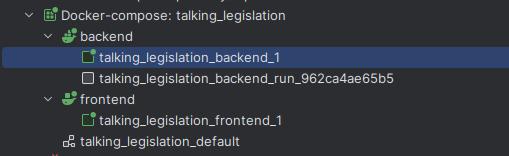
Finally, Docker and Docker Compose have been invaluable for ensuring consistency across development and production environments. They also make it easier to manage the various components of your stack.

version: '3'
services:
  web:
    build: .
    ports:
      - "8000:8000"
  db:
    image: postgres:13
    environment:
      POSTGRES_DB: myapp
      POSTGRES_PASSWORD: mypassword

In production, you’ll likely use an orchestration script to spin up the services on a cloud provider (like Azure or AWS) but they’ll use your web container build.

Using Asynchronous Programming

If you’re building LLM-powered applications and you’re not using asynchronous programming, you’re in for a world of pain. Or at least a world of very slow, unresponsive applications. Let me explain why.

Async for LLM Apps

LLM API calls are slow. I’m talking 1-10 seconds slow. That might not sound like much, but in computer time, it’s an eternity. If you’re making these calls synchronously, your application is going to spend most of its time twiddling its thumbs, waiting for responses.

Async programming allows your application to do other useful work while it’s waiting for those sluggish LLM responses.

The Async Advantage

To illustrate the difference, let’s look at a simple example. Imagine we need to make three LLM API calls:

import asyncio
import time

async def fake_llm_call(call_id):
    await asyncio.sleep(2)  # Simulating a 2-second API call
    return f"Result from call {call_id}"

async def main_async():
    start = time.time()
    results = await asyncio.gather(
        fake_llm_call(1),
        fake_llm_call(2),
        fake_llm_call(3)
    )
    end = time.time()
    print(f"Async took {end - start} seconds")
    print(results)

asyncio.run(main_async())

This async version will take about 2 seconds to complete all three calls.

Now, let’s look at the synchronous equivalent:

def sync_fake_llm_call(call_id):
    time.sleep(2)  # Simulating a 2-second API call
    return f"Result from call {call_id}"

def main_sync():
    start = time.time()
    results = [
        sync_fake_llm_call(1),
        sync_fake_llm_call(2),
        sync_fake_llm_call(3)
    ]
    end = time.time()
    print(f"Sync took {end - start} seconds")
    print(results)

main_sync()

This synchronous version will take about 6 seconds.
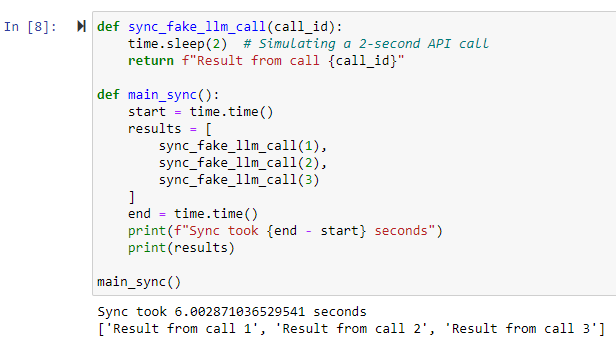
That’s three times slower! In a real-world application with multiple API calls, the difference can be even more dramatic.

Async Task Queue

When building LLM-powered applications with FastAPI, you’ll often encounter scenarios where you need to handle long-running tasks without blocking the main application (i.e. waiting for the LLM client to return data). This is where an async task queue comes in handy. It allows you to offload time-consuming operations (like complex LLM generations) to background workers, improving the responsiveness of your API.

Here’s a basic example of how you can implement an async task queue in FastAPI:

from fastapi import FastAPI, BackgroundTasks
from pydantic import BaseModel
import asyncio

app = FastAPI()

class Task(BaseModel):
    id: str
    status: str = "pending"
    result: str = None

tasks = {}

async def process_task(task_id: str):
    # Simulate a long-running LLM task
    await asyncio.sleep(10)
    tasks[task_id].status = "completed"
    tasks[task_id].result = f"Result for task {task_id}"

@app.post("/tasks")
async def create_task(background_tasks: BackgroundTasks):
    task_id = str(len(tasks) + 1)
    task = Task(id=task_id)
    tasks[task_id] = task
    background_tasks.add_task(process_task, task_id)
    return {"task_id": task_id}

@app.get("/tasks/{task_id}")
async def get_task(task_id: str):
    return tasks.get(task_id, {"error": "Task not found"})

In this example, we’re using FastAPI’s BackgroundTasks to manage our task queue. When a client creates a new task, we immediately return a task ID and start processing the task in the background. The client can then poll the /tasks/{task_id} endpoint to check the status of their task.

This approach has several advantages:

  1. Responsiveness: Your API can quickly acknowledge task creation without waiting for the task to complete.
  2. Scalability: You can easily distribute tasks across multiple workers.
  3. Fault Tolerance: If a task fails, it doesn’t bring down your entire application.

For more complex scenarios, you might want to consider using a dedicated task queue system like Celery or RQ (Redis Queue). These provide additional features like task prioritisation, retries, and distributed task processing. However, for many LLM applications, FastAPI’s built-in background tasks are more than sufficient.

(A few years ago I had to almost always resort to the more complex Celery or Redis, which came with it’s own set of headaches – async BackgroundTasks have come on a lot and are now easier and quicker to implement for most initial use cases.)

Here’s an example of running such a task queue in a Jupyter Notebook using a Test Client.

Remember, when working with async task queues, it’s crucial to handle errors gracefully and provide clear feedback to the client about the task’s status. You might also want to implement task timeouts and cleanup mechanisms to prevent your task queue from growing indefinitely.

Async LLM Clients

Both OpenAI and Anthropic now how working async clients. These were patchy or undocumented a few months ago but they are slowly gaining ground as part of the official documented software development kits (SDKs). The async clients allow you to make non-blocking API calls to LLM services. This can significantly improve the performance of applications that need to make multiple LLM requests concurrently.

OpenAI Async Client

OpenAI’s Python library supports async operations out of the box. Here’s a basic example of how to use it:

from openai import AsyncOpenAI
import asyncio

async def main():
    client = AsyncOpenAI()
    response = await client.chat.completions.create(
        model="gpt-4o",
        messages=[
            {"role": "system", "content": "You are a helpful assistant."},
            {"role": "user", "content": "What is the capital of France?"}
        ]
    )
    print(response.choices[0].message.content)

# This for in a script
asyncio.run(main())
# Or this for within Jupyter Notebooks
# For interactive environments (like Jupyter)
loop = asyncio.get_event_loop()
if loop.is_running():
    loop.create_task(main())
else:
    loop.run_until_complete(main())

Key points about OpenAI’s async client:

  • It’s part of the official openai Python package.
  • You can create an AsyncOpenAI client to make async calls.
  • Most methods that make API requests have async versions.
  • It’s compatible with Python’s asyncio ecosystem.

Anthropic Async Client

Anthropic also provides async support in their official Python library. Here’s a basic example:

from anthropic import AsyncAnthropic
import asyncio

async def main():
    client = AsyncAnthropic()
    response = await client.messages.create(
        model="claude-3-5-sonnet-20240620",
        max_tokens=300,
        messages=[
            {
                "role": "user",
                "content": "What is the capital of Spain?",
            }
        ],
    )
    print(response.content)

# This for in a script
asyncio.run(main())
# Or this for within Jupyter Notebooks
# For interactive environments (like Jupyter)
loop = asyncio.get_event_loop()
if loop.is_running():
    loop.create_task(main())
else:
    loop.run_until_complete(main())

Key points about Anthropic’s async client:

  • It’s part of the official anthropic Python package.
  • You can create an AsyncAnthropic client for async operations.
  • Most API methods have async counterparts.
  • It integrates well with Python’s async ecosystem.

Benefits of Using Async Clients

  1. Improved Performance: You can make multiple API calls concurrently, reducing overall wait time.
  2. Better Resource Utilisation: Your application can do other work while waiting for API responses.
  3. Scalability: Async clients are better suited for handling high volumes of requests.

Async Libraries for Python

Python’s asyncio library is your bread and butter for async programming. However, you’ll also want to get familiar with libraries like aiohttp for making asynchronous HTTP requests, which you might need if interacting with other web-API services.

import aiohttp
import asyncio

async def fetch(session, url):
    async with session.get(url) as response:
        return await response.text()

async def main():
    async with aiohttp.ClientSession() as session:
        html = await fetch(session, 'http://python.org')
        print(html[:50])

# This for in a script
asyncio.run(main())
# Or this for within Jupyter Notebooks
# For interactive environments (like Jupyter)
loop = asyncio.get_event_loop()
if loop.is_running():
    loop.create_task(main())
else:
    loop.run_until_complete(main())
The Async Learning Curve

Now, I won’t lie to you – async programming can be a bit of a mind-bender at first. Concepts like coroutines, event loops, and futures might make you feel like you’re learning a whole new language. And in a way, you are. You’re learning to think about programming in a fundamentally different way.

The good news is that once it clicks, it clicks. And the performance benefits for LLM applications are well worth the initial struggle.

I’ve found support get a lot better over the last 12 months. Examples were pretty much non-existent a year ago. Now there are a few and LLMs are up to date enough to offer a first (non-working) example to get you going.

Testing and Debugging Async Code

One word of warning: testing and debugging async code can be… interesting. Race conditions and timing-dependent bugs can be tricky to reproduce and fix. Tools like pytest-asyncio can help, but be prepared for some head-scratching debugging sessions.

The Async Ecosystem is Still Maturing

As of 2024, the async ecosystem in Python is still a bit rough around the edges. Documentation can be sparse, and best practices are still evolving. But don’t let that deter you – async is the future for LLM applications, and the sooner you get on board, the better off you’ll be.

Remember, the goal here isn’t to make your code more complex. It’s to make your LLM applications more responsive and efficient. And in a world where every millisecond counts, that’s not just nice to have – it’s essential.

Parallelisation for High-Quality Output Generation

When it comes to LLM-powered applications, sometimes you need to go fast, and sometimes you need to go deep. Parallelisation lets you do both – if you’re clever about it.

Why Parallelise?

First off, let’s talk about why you’d want to parallelise your LLM requests:

  1. Speed: Obviously, doing things in parallel is faster than doing them sequentially. If you’re making multiple independent LLM calls, why wait for one to finish before starting the next?
  2. Improved Output Quality: By running multiple variations of a prompt in parallel, you can generate diverse outputs and then select or combine the best results.
  3. Handling Complex Tasks: Some tasks require multiple LLM calls with interdependent results. Parallelisation can help manage these complex workflows more efficiently.

Parallelisation Strategies

Here are a few strategies you can employ:

Simple Parallel Requests

This is the most straightforward approach. If you have multiple independent tasks, just fire them off concurrently.

import asyncio
from openai import AsyncOpenAI

async def generate_text(client, prompt):
    response = await client.chat.completions.create(
        model="gpt-4",
        messages=[{"role": "user", "content": prompt}]
    )
    return response.choices[0].message.content

async def main():
    client = AsyncOpenAI()
    prompts = [
        "Write a short poem about Python",
        "Explain quantum computing in simple terms",
        "List 5 benefits of exercise"
    ]
    results = await asyncio.gather(*(generate_text(client, prompt) for prompt in prompts))
    for prompt, result in zip(prompts, results):
        print(f"Prompt: {prompt}\nResult: {result}\n")

# This for in a script
asyncio.run(main())
# Or this for within Jupyter Notebooks
# For interactive environments (like Jupyter)
loop = asyncio.get_event_loop()
if loop.is_running():
    loop.create_task(main())
else:
    loop.run_until_complete(main())

Parallel Variations for Quality

Generate multiple variations of the same prompt in parallel, then select or combine the best results.

async def generate_variations(client, base_prompt, num_variations=3):
    tasks = []
    for i in range(num_variations):
        prompt = f"{base_prompt}\nVariation {i+1}:"
        tasks.append(generate_text(client, prompt))
    return await asyncio.gather(*tasks)

async def main():
    client = AsyncOpenAI()
    base_prompt = "Generate a catchy slogan for a new smartphone"
    variations = await generate_variations(client, base_prompt)
    print("Generated slogans:")
    for i, slogan in enumerate(variations, 1):
        print(f"{i}. {slogan.strip()}")

# This for in a script
asyncio.run(main())
# Or this for within Jupyter Notebooks
# For interactive environments (like Jupyter)
loop = asyncio.get_event_loop()
if loop.is_running():
    loop.create_task(main())
else:
    loop.run_until_complete(main())

Parallel Subtasks

For complex tasks, break them down into subtasks that can be executed in parallel.

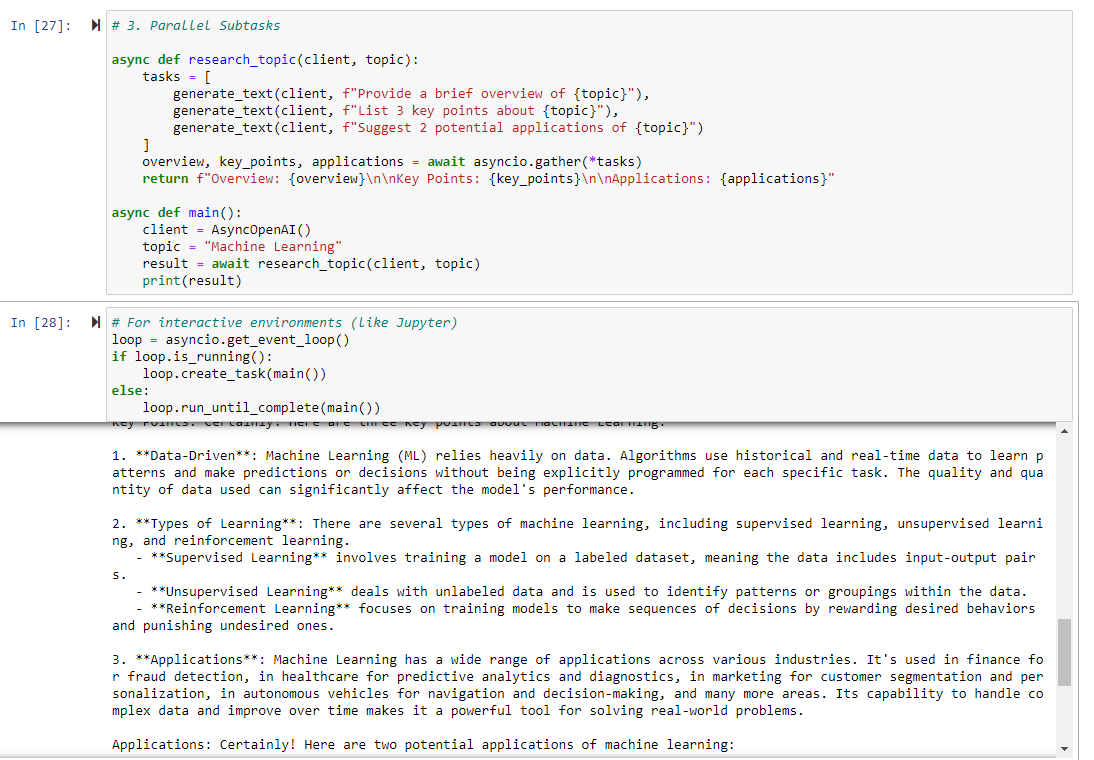
async def research_topic(client, topic):
    tasks = [
        generate_text(client, f"Provide a brief overview of {topic}"),
        generate_text(client, f"List 3 key points about {topic}"),
        generate_text(client, f"Suggest 2 potential applications of {topic}")
    ]
    overview, key_points, applications = await asyncio.gather(*tasks)
    return f"Overview: {overview}\n\nKey Points: {key_points}\n\nApplications: {applications}"

async def main():
    client = AsyncOpenAI()
    topic = "Machine Learning"
    result = await research_topic(client, topic)
    print(result)

# This for in a script
asyncio.run(main())
# Or this for within Jupyter Notebooks
# For interactive environments (like Jupyter)
loop = asyncio.get_event_loop()
if loop.is_running():
    loop.create_task(main())
else:
    loop.run_until_complete(main())

Considerations and Caveats

While parallelisation can significantly boost your application’s performance, it’s not without its challenges:

  1. API Rate Limits: Most LLM providers have rate limits. Make sure your parallel requests don’t exceed these limits, or you’ll end up with errors instead of speed gains. When working with legal applications my number of “matters” are normally in the thousands and my rate limits are in the order of millions per minute, so it makes sense to speed things up by running requests in parallel.
  2. Cost Considerations: Remember, each parallel request costs money. Make sure the benefits outweigh the increased API usage costs.
  3. Result Consistency: When generating variations, you might get inconsistent results. You’ll need a strategy to reconcile or choose between different outputs.
  4. Complexity: Parallel code can be harder to debug and maintain. Make sure the performance gains justify the added complexity.
  5. Resource Management: Parallelisation can be resource-intensive. Monitor your application’s memory and CPU usage, especially if you’re running on constrained environments.

Implementing Parallelisation

In Python, the asyncio library is your friend for implementing parallelisation. For more complex scenarios, you might want to look into libraries like aiohttp for making async HTTP requests, or even consider distributed task queues like Celery for large-scale parallelisation.

Remember, parallelisation isn’t a magic bullet. It’s a powerful tool when used judiciously, but it requires careful thought and implementation. Start simple, measure your gains, and scale up as needed. And always, always test thoroughly – parallel bugs can be particularly sneaky!

Leveraging LLMs in the Development Process

As developers, we’re always on the lookout for tools that can streamline our workflow and boost productivity. LLMs like ChatGPT and Claude have emerged as powerful allies in the development process. Let’s dive into how you can effectively leverage these AI assistants in your coding projects.

Setting Up Your LLM Workspace

One approach that’s worked well is setting up a dedicated Claude Project for each coding project. Here’s how you can structure this:

  1. Initialise the Project: Create a new Claude Project for your coding project (basically ~ to a GitHub repository).
  2. Load Key Materials: Populate the project with essential documents:
    • Style guides and quality guidelines
    • Project background and requirements
    • Key code files developed so far
    • Examples of similar implementations you admire
  3. Branch Management: Develop individual features on separate git branches, each with its own chat off the main project.
  4. Keep It Updated: As you progress, regularly update the project materials with the latest code files.

Leveraging LLMs for Feature Development

LLMs like Claude excel at quickly coding discrete features across 2-3 files, but they can struggle with integrating into complex existing systems. Here’s a strategy to make the most of their capabilities:

  1. Generate a Toy Version: Use Claude to create a standalone version of your feature.
  2. Implement as a Separate Package: Take the LLM-generated code and implement it on a new feature git branch as a separate Python package (i.e., folder) within the existing code repo.
  3. Iterate with Tests: Get the feature working independently, using tests to guide your iterations. Pop your tests in a separate test folder corresponding to your separate Python package.
  4. Manual Integration: Once your feature is working as desired, handle the integration into your main codebase yourself.

If you need to edit existing functions and classes:

  1. Find and Isolate Files and Tests: Identify the files that will be modified by your proposed update. This is generally the first step in bug fixing anyway. If in doubt, create a test that calls the method, function, or class you need to modify/fix/improve, then trace the call stack in an IDE debug mode (I use Pycharm Pro). Copy this files into the chat. Try to keep these below 3-5 (good coding practice anyway).
  2. Use Test-Driven Development: Write new tests in your existing suite that match the new functionality you want to implement.
  3. Get LLM to Sketch and Summarise the Existing Interfaces: Define your updates schematically first – set out new method interfaces, variables, and passed data. Use these in your tests (which should be failing at this stage).
  4. Fix the Interfaces and Generate Internal Code: Then get the LLM to fill in the functional code. Copy into your git branch and run the tests. Iterate pasting back the errors until you get something working.
  5. Aim for 100% Coverage and Use to Prevent Unintended Consequences: By generating tests as you code, you can ensure that other portions of you codes are covered by tests. This helps when you modify anything (LLMs and you will get it wrong first 1-3 times) – run the tests, see what is broke, work out why, fix, repeat until everything passes.
  6. Use Git/GitHub Pull Requests and Code Review: This is an extra review stage to catch dodgy LLM solutions that still pass the tests before integrating into your production code.

Best Practices and Considerations

While LLMs can be incredibly helpful, it’s important to use them judiciously:

  1. Code Review: Always review LLM-generated code thoroughly. These models can produce impressive results, but they can also make mistakes or introduce subtle bugs.
  2. Avoid Integration Hallucinations: LLMs like Claude or Copilot may hallucinate existing code structures. Don’t rely on them for integrating with your existing codebase.
  3. Use for Ideation: LLMs are excellent for brainstorming and getting quick prototypes. Use them to explore different approaches to a problem. I’m not a front-end person but in a few hours you can get a working React prototype you can show to frontend developers and go – something like this!
  4. Documentation and Comments: Ask the LLM to provide detailed comments and documentation for the code it generates. This can save you time and ensure better code understanding.
  5. Learning Tool: Use LLMs to explain complex code or concepts. They can be excellent teachers for new programming paradigms or libraries.

Real-World Example: Developing a New API Endpoint

Let’s say you’re adding a new API endpoint to your FastAPI application. Here’s how you might use Claude:

  1. Outline the Feature: Describe the new endpoint to Claude, including expected inputs and outputs.
  2. Generate Initial Code: Ask Claude to create a basic implementation, including the endpoint function, any necessary data models, and unit tests.
  3. Iterate and Refine: Use Claude to help refine the code, optimize performance, and enhance error handling.
  4. Documentation: Have Claude generate OpenAPI documentation for your new endpoint.
  5. Testing: Use Claude to suggest additional test cases and help implement them.
  6. Manual Integration: Once you’re satisfied with the standalone implementation, integrate it into your main application yourself.

The Limits of LLM Assistance

While LLMs are powerful tools, they’re not a replacement for human developers. They excel at certain tasks:

  • Quick prototyping
  • Explaining complex concepts
  • Generating boilerplate code
  • Suggesting optimisation techniques

But they struggle with:

  • Understanding the full context of large codebases
  • Making architectural decisions that affect the entire system
  • Ensuring code aligns with all business rules and requirements

Integrating LLMs like Claude into your development process can significantly boost productivity and spark creativity. However, you need to understand their strengths and limitations. Use them as powerful assistants, but remember that the final responsibility for the code and its integration lies with you, the developer.

By leveraging LLMs thoughtfully in your workflow, you can accelerate feature development, improve code quality, and free up more of your time for the complex problem-solving that human developers do best.

Prompt Tips

Best practice on using prompts has been developing at a steady pace. The cycle seems to be:

  1. fudge something to get it working and get around limitations;
  2. have major LLM providers improve the limitations so the fudge isn’t needed as much;
  3. find documented examples where someone has had a better idea;
  4. GOTO 1.

Here are some aspects of using prompts that work at the moment.

Keep it Simple

Keep prompts simple.

Initially, I’d have lots of fancy string concatenation methods to generate conditional strings based on the content of my data. While this is helpful in streamlining the prompts and leaving out extra information that can sometimes confuse the LLM, it does make it difficult to view and evaluate prompts.

A better approach is to treat each LLM interaction as a single action with a single prompt. The single prompt has variable slots and these are populated by your logic code prior to the request.

Storage

A nice tool to use is Jinja templates. Those familiar with Flask will be well acquainted with these for creating HTML templates. But they can also be used for generating just text templates. And they have a long history of use and examples to help you.

Based on traditional Jinja template use, a good setup is to have a “prompt” or “prompt template” folder that has a number of text files (simple “.txt”).

# prompt_templates/patent_review.txt
You are a patent analysis assistant.

Patent Document:
Title: {{ patent_title }}
Filing Date: {{ filing_date }}
Inventors: {{ inventors }}
Technology Field: {{ tech_field }}

Please analyse the following patent content:
---
{{ patent_content }}
---

Focus your analysis on:
1. Novel features claimed
2. Scope of protection
3. Potential prior art considerations
4. Commercial implications
# prompt_templates/contract_summary.txt
You are a contract analysis assistant.

Contract Details:
Title: {{ contract_title }}
Parties: {{ parties }}
Date: {{ contract_date }}
Type: {{ contract_type }}

Please analyse the following contract:
---
{{ contract_content }}
---

Provide a summary covering:
1. Key terms and conditions
2. Obligations of each party
3. Important deadlines
4. Risk areas
5. Recommended amendments
# prompt_templates/legal_analysis.txt
You are a legal assistant helping analyse documents.

Document Information:
Title: {{ document_title }}
Type: {{ document_type }}
Author: {{ author }}
Date Created: {{ date_created }}
Jurisdiction: {{ jurisdiction }}
Reviewer: {{ reviewer_name }}

Please analyse the following document content for {{ analysis_type }}:
---
{{ document_content }}
---

Provide a detailed analysis covering:
1. Key legal points
2. Potential issues or risks
3. Recommended actions

Here’s a short Python example that uses these:

# Directory structure:
# my_project/
# ├── prompt_templates/
# │   ├── legal_analysis.txt
# │   ├── patent_review.txt
# │   └── contract_summary.txt
# ├── db_connector.py
# └── prompt_manager.py

# db_connector.py
import sqlite3
from dataclasses import dataclass
from typing import Optional

@dataclass
class Document:
    id: int
    title: str
    content: str
    doc_type: str
    date_created: str
    author: Optional[str]

class DatabaseConnector:
    def __init__(self, db_path: str):
        self.db_path = db_path
        
    def get_document(self, doc_id: int) -> Document:
        with sqlite3.connect(self.db_path) as conn:
            cursor = conn.cursor()
            cursor.execute("""
                SELECT id, title, content, doc_type, date_created, author 
                FROM documents 
                WHERE id = ?
            """, (doc_id,))
            row = cursor.fetchone()
            
            if not row:
                raise ValueError(f"Document with id {doc_id} not found")
                
            return Document(
                id=row[0],
                title=row[1],
                content=row[2],
                doc_type=row[3],
                date_created=row[4],
                author=row[5]
            )

# prompt_manager.py
import os
from pathlib import Path
from typing import Dict, Any
from jinja2 import Environment, FileSystemLoader
from anthropic import Anthropic

class PromptManager:
    def __init__(self, templates_dir: str, anthropic_api_key: str):
        self.env = Environment(
            loader=FileSystemLoader(templates_dir),
            trim_blocks=True,
            lstrip_blocks=True
        )
        self.client = Anthropic(api_key=anthropic_api_key)
        
    def load_template(self, template_name: str) -> str:
        """Load a template file and return it as a string."""
        return self.env.get_template(f"{template_name}.txt")
        
    def render_prompt(self, template_name: str, variables: Dict[str, Any]) -> str:
        """Render a template with the provided variables."""
        template = self.load_template(template_name)
        return template.render(**variables)
        
    async def send_prompt(self, prompt: str, model: str = "claude-3-sonnet-20240229") -> str:
        """Send the rendered prompt to Claude and return the response."""
        message = await self.client.messages.create(
            model=model,
            max_tokens=4000,
            messages=[{"role": "user", "content": prompt}]
        )
        return message.content

# Example usage
async def main():
    # Initialize managers
    db = DatabaseConnector("legal_docs.db")
    prompt_mgr = PromptManager(
        templates_dir="prompt_templates",
        anthropic_api_key="your-api-key"
    )
    
    # Get document from database
    doc = db.get_document(doc_id=123)
    
    # Prepare variables for template
    variables = {
        "document_title": doc.title,
        "document_content": doc.content,
        "document_type": doc.doc_type,
        "author": doc.author or "Unknown",
        "date_created": doc.date_created,
        "analysis_type": "legal_review",
        "jurisdiction": "UK",
        "reviewer_name": "John Smith"
    }
    
    # Render prompt from template
    prompt = prompt_mgr.render_prompt("legal_analysis", variables)
    
    # Send to Claude and get response
    response = await prompt_mgr.send_prompt(prompt)
    print(response)

if __name__ == "__main__":
    import asyncio
    asyncio.run(main())

Versioning

You’ll endlessly tweak your prompts. This makes it difficult to keep on track of changes.

Git is your first friend here. Make sure your template directory is added to git, so you can track changes over time. If you host your code in GitHub or GitBucket you can use a web-interface to flick through different versions of the prompts with different commits.

You might also want to set up a manual or automated version numbering system (e.g. 0.1.0, 2.2.12) to reflect changes as you go along. This could be available programmatically and stored with your prompt in logs and test examples.

Make it Easy to Test

The Anthropic Workbench has got a lot better over the last year and provides a template for how to structure prompts.

The Workbench has a “Prompt” screen where you can compose and test prompts and an “Evaluate” screen where you can evaluate prompts over a number of runs. The Evaluate option provides a useful guide to how you can evaluate prompts over time.

Build a Test Dataset

Use a machine-learning style dataset with input and output pairs, where the output is a ground-truth example. Structure your input as per your prompt variables. Anthropic Workbench allows you to upload examples in CSV format. So think about storing this data in a spreadsheet style format (you can always stored in a database and write a script to convert to CSV via pandas).

Each row of your test dataset should have column headings that reflect your prompt variables, then a column that represents an “ideal_output”, then a column “model_output” that can be used to store results. The Workbench also uses a scoring system so you might want to add a “score” column for recording a manually assigned score from 1 (Poor) to 5 (Excellent).

Data arranged in this way can then be uploaded and exported from the Anthropic Workbench, allowing you to quickly compare Anthropic models.

I’d also recommend storing the current version of your prompt, either by copying and pasting or (better) providing a link to the current prompt file and current version (e.g., GitHub link and commit hash).

If your data is arranged in this format you can also write little scripts to automate sending the examples off into APIs and record the results.

Prompt Logging

API calls cost money. But you often need to run end-to-end tests through the LLM API. It can also be difficult to debug LLM applications – is the problem in your code and logic or in the prompt?

Proper logging of prompts can help you trace errors and find out exactly what you were sending to the LLM. Problem is prompts are often long and verbose. Simple standard output line logging falls down and other logging gets drowned out by logged API calls and responses.

Another problem is the actual LLM call can have a series of text and/or image user messages, but a human needs to read the simple flattened LLM text with populated data. Also images are transmitted as base64 encoded strings – you need to filter these out of your prompts otherwise they will take over any logs with encoded string rubbish.

There are several companies out there that propose to sell LLM logging solutions. But I find them complex and they often involve sending yet more data off into a nondescript third party cloud – not great if you are trying to secure the call chain.

If I was clever, I’d be able to set up a separate Python logger for the LLM calls and have this log to a separate database.

But I’m not. So as a compromise, I’ve found that a simple standalone JSON or MongoDB package I can reuse across projects works well. I can then pass the messages that I pass to the LLM client, and write some simple code to flatten this and save it as a cleaned string. I can then save with some UUIDs of related objects/users/tasks to then trace it back to a code flow.

Conclusion

As we’ve explored in this post covering technical implementations of LLM-powered systems, building robust applications requires careful consideration of architecture, asynchronous programming, parallelisation strategies, and thoughtful prompt engineering. The rapid evolution of LLM capabilities means we’re often building tomorrow’s solutions with today’s tools, requiring flexibility and adaptability in our approach.

We’ve seen how a well-structured tech stack, centered around FastAPI and modern async programming patterns, can provide a solid foundation for LLM applications. The move towards asynchronous programming isn’t just a performance optimisation—it’s becoming essential for handling the inherently slow nature of LLM API calls effectively. Similarly, parallelisation strategies offer powerful ways to improve both speed and output quality, though they require careful management of resources and rate limits.

The integration of LLMs into the development process itself represents an interesting meta-level application of these technologies. While they can significantly accelerate certain aspects of development, success lies in understanding their limitations and using them judiciously as part of a broader development strategy.

Perhaps most importantly, we’ve learned that effective implementation isn’t just about the code—it’s about creating sustainable, maintainable systems. This means paying attention to prompt management, testing strategies, and logging systems that can help us understand and improve our LLM applications over time.

In our next and final post in this series, we’ll examine the persistent challenges and issues that remain in working with LLMs, including questions of reliability, evaluation, and the limitations we continue to encounter. Until then, remember that we’re all still pioneers in this rapidly evolving field—don’t be afraid to experiment, but always build with care and consideration for the future.

Key Insights from a Year of Working with LLMs (2/4)

  1. Introduction
  2. Model-Specific Observations
    1. The Arrival of Capable Vision Models
    2. GPT4o and Claude 3.5 Sonnet: Solid Foundations for Complex Tasks
      1. Evolution and Current Capabilities
      2. History
      3. Practical Applications
    3. The Unexpected Utility of Mini Models
      1. Key Mini Models
      2. Characteristics and Use Cases
      3. Potential Applications
      4. Limitations in Legal Work
    4. Long Contexts: Opportunities and Challenges
      1. Rapid Evolution
      2. Current State of Long Contexts
      3. Opportunities
      4. Challenges
      5. The Output Context Limitation
      6. Further Work
  3. Conclusion

Introduction

In the first post of this series, we explored general process insights gained from a year of intensive work with Large Language Models (LLMs). We discussed the importance of context, the power of iterative refinement, and the shift in creative processes that LLMs have brought about. These insights laid the groundwork for understanding how LLMs are changing our approach to complex tasks, particularly in legal and business contexts.

As we continue our exploration, this second post focuses on model-specific observations. Over the past year, we’ve seen notable advancements in LLM capabilities, from the introduction of powerful vision models to the emergence of highly capable “mini” models. We’ve also witnessed the expansion of context windows and the refinement of top-tier models like GPT-4 and Claude 3.5 Sonnet.

In this post, we’ll look into four key areas:

  1. The arrival of capable vision models and their potential applications
  2. GPT-4o and Claude 3.5 Sonnet as solid foundations for complex tasks
  3. The unexpected utility of mini models in specific use cases
  4. The opportunities and challenges presented by long context windows

These observations are valuable for anyone working with or planning to implement LLMs in their workflows. Understanding the strengths, limitations, and optimal use cases for different models can help you make more informed decisions about which tools to use and how to use them effectively.

Let’s dive into these model-specific insights and explore how they can shape our approach to leveraging LLMs in legal and business contexts.

Model-Specific Observations

The Arrival of Capable Vision Models

Over the past year, we’ve seen a notable advancement in LLM technology with the integration of vision capabilities (officially Large Vision Models – LVMs – but I’ll assume LLMs include LVMs). Models like GPT-4o (previously GPT4 – Vision) and Claude 3.5 Sonnet can now process and understand visual information alongside text, opening up new possibilities for AI applications.

These models can analyse images, answer questions about visual content, and even count objects within images. Implementing vision capabilities requires some adjustments to classic text pipelines. For example, API requests need tweaking to provide image as well as text data, with the possibility of interleaving the two. Practically images are provided as base64 encoded strings or via URLs. For those interested in implementation details, both OpenAI and Anthropic provide comprehensive documentation.

While many organisations are still focused on text-based LLM integration, vision models offer exciting possibilities:

  • Document Analysis: Extracting information from forms, diagrams, or handwritten notes.
  • Visual Compliance Checks: Identifying safety violations or non-compliant elements in images.
  • Enhanced Legal Research: Analysing visual evidence or diagrams in patent applications.

Looking ahead, technologies like ColPali, which combines vision and language models for document retrieval, show promise for improving how we search and analyse visual information in documents. Additionally, specialised models like YOLO (You Only Look Once – we’re onto version 2 3) for object detection and SAM2 (Segment Anything Model 2) for image segmentation offer potential for more nuanced understanding of visual content, though their integration into business processes is still in early stages. For example, we are missing mature real-time libraries for rapid image evaluations.

Despite their potential, vision models do present challenges, including increased computational requirements, new privacy considerations for visual data, and the need for human oversight to ensure accuracy and reliability.

The integration of vision capabilities into LLMs represents a significant step forward. As these technologies mature, we can expect to see innovative applications across multiple industries, including law and business. However, it’s worth noting that many organisations are still in the early stages of exploring these capabilities, with text-based applications remaining the primary focus for now.

GPT4o and Claude 3.5 Sonnet: Solid Foundations for Complex Tasks

Over the past year, we’ve witnessed significant advancements in large language models, with GPT4o and Claude 3.5 Sonnet emerging as robust foundations for complex tasks in various domains, including law and business.

Evolution and Current Capabilities

GPT4o (OpenAI)

  • Released on May 13, 2024, as part of the GPT-4 family
  • Key feature: Incorporation of vision functionality (multimodal capabilities)
  • Context window: 128,000 tokens
  • Performance: Faster than GPT-4 Turbo, generally more stable
  • Qualitative assessment: Capabilities between GPT-4 and GPT-4 Turbo, suitable for most GPT-4 use cases
  • Current pricing (as of October 2024): $2.50 / 1M input tokens, $10.00 / 1M output tokens

Claude 3.5 Sonnet (Anthropic)

  • Released on June 20, 2024, as an upgrade to the Claude 3 family
  • Context window: 200,000 tokens
  • Key improvements: Enhanced coding abilities, multistep workflows, and image interpretation
  • Notable feature: Introduction of Artifacts for real-time code rendering
  • Extended output capability: Up to 8,192 tokens (as of August 19, 2024)
  • Current pricing (as of October 2024): $1.25 / 1M input tokens, $5.00 / 1M output tokens

History

The development of these models represents a rapid evolution in AI capabilities. Here’s a brief timeline of key milestones:

OpenAI’s GPT Series:

  • March 15, 2022: GPT-3.5 released (as “text-davinci-002” and “code-davinci-002”)
  • March 14, 2023: GPT-4 released (with initial waitlist)
  • November 6, 2023: GPT-4 Turbo introduced, featuring 128K context window
  • May 13, 2024: GPT4o (Omni) released, incorporating vision functionality
  • September 2024: o1 Series Preview released (o1-preview, o1-mini)

Anthropic’s Claude Series:

  • March 2023: Claude 1 API launched
  • July 2023: Claude 2 released, with 100K token context window
  • November 2023: Claude 2.1 released, expanding context to 200K tokens
  • March 14, 2024: Claude 3 family (Haiku, Sonnet, Opus) released
  • June 20, 2024: Claude 3.5 Sonnet released, with improved coding and image interpretation
  • August 19, 2024: Extended output (8,192 tokens) for Claude 3.5 Sonnet made generally available

This timeline illustrates the rapid pace of development in large language models, with both OpenAI and Anthropic consistently increasing context sizes, improving performance, and introducing new capabilities such as vision processing and extended output generation.

The rapidly developing oligopoly is good for consumers and businesses, driving the conversion of venture capital cash into useful feature development.

Practical Applications

Both models (GPT4o and Claude 3.5 Sonnet) are effective for generating professional level output. There is still a bias to an American, online-marketing influenced enthusiasm but this can often been eliminated via careful prompting.

Both models are capable of generating working small code projects (with Claude 3.5 having the slight edge) and, via an iterative chat, of generating good enough content for standard Internet publishing (this blog series is generated in collaboration with Claude 3.5). Neither model is ready to be left alone to output content without careful human checking though. Their fluency with words often hides a shallowness of information content. This can be addressed to a certain extent in providing high quality “first draft” information and good context. But “garbage in, garbage out” still reigns.

For example, both models are capable of writing competent sounding business letters and emails. In terms of reasoning abilities, they can probably meet the level of “average, half-awake, mid-tier, business manager, graduate”, especially if all the content needed for the reasoning is available in the prompt and there are clearly defined action possibilities. They are likely able to as a secretarial first-instance response generator to be checked / changed / regenerated by a human in the loop.

Later on in the post series we’ll look in more detail at the current limitations of these models for legal applications.

While these models provide powerful capabilities, it’s crucial to remember that human oversight remains necessary, especially for high-stakes tasks. The value of GPT4o and Claude 3.5 Sonnet lies in augmenting human intelligence, offering rapid information processing and idea generation.

At present model development has been rather quicker than development capacity to really build systems around them. Just last summer (August 2023) it appeared that progress had stalled with GPT-4, but Claude coming online and continued rapid model evolution means we are coming to expect jobs in capability every 6 months or so. Indeed, Claude Opus 3.5 – their higher specification model – is still to be released.

As we continue working with these models, we’re constantly discovering new applications, in turn pushing the boundaries of AI-assisted professional work. The rapid evolution of these models, as evidenced by their release timelines, suggests that we can expect further improvements and capabilities in the near future.
The Unexpected Utility of Mini Models

As discussed briefly in our first post, mini models have emerged as surprisingly capable tools for specific tasks within complex workflows. These models, designed for speed and efficiency, offer a balance between performance and cost that opens up new possibilities for AI integration in various fields.

Key Mini Models

GPT-4o mini (OpenAI)

  • Link: https://openai.com/index/gpt-4o-mini-advancing-cost-efficient-intelligence/
  • Release date: July 18, 2024
  • Context window: 128,000 tokens
  • Key features:
    • Scores 82% on MMLU (Massive Multitask Language Understanding)
    • Supports text and vision inputs
    • Knowledge cutoff up to October 2023
    • Supports up to 16,384 output tokens per request
    • Improved tokenizer for more cost-effective handling of non-English text
    • Strong performance in function calling and long-context tasks
  • Pricing:
    • Input: $0.15 per million tokens
    • Output: $0.60 per million tokens
    • Over 60% cheaper than GPT-3.5 Turbo

Claude 3 Haiku (Anthropic)

  • Link: https://www.anthropic.com/news/claude-3-haiku
  • Release date: March 14, 2024
  • Context window: 200,000 tokens
  • Key features:
    • Fastest model in the Claude 3 family, processing 21K tokens (~30 pages) per second for prompts under 32K tokens
    • Strong performance on industry benchmarks (MMLU score of 0.752)
    • State-of-the-art vision capabilities
    • Designed for rapid analysis of large datasets
    • Three times faster than peers for most workloads
    • Optimized for enterprise-grade security and robustness
  • Pricing:
    • Input: $0.25 per million tokens
    • Output: $1.25 per million tokens

Gemini 1.5 Flash (Google)

  • Link: https://developers.googleblog.com/en/gemini-15-flash-8b-is-now-generally-available-for-use/
  • Release date: May 24, 2024 (initial version gemini-1.5-flash-001)
  • Context window: 1 million tokens
  • Key features:
    • Optimized for narrower or high-frequency tasks where response time is crucial
    • Natively multimodal, supporting text, images, audio, and video inputs
    • Improved performance for tasks like chat, transcription, and long context language translation
    • Supports adding image, audio, video, and PDF files in text or chat prompts
    • JSON mode support (added August 30, 2024)
  • Pricing:
    • 50% lower price compared to the previous 1.5 Flash model
    • Described as having the “lowest cost per intelligence of any Gemini model”

Characteristics and Use Cases

These mini models are designed for real-time interaction, embodying a “System 1” thinking style – quick and generally accurate, but potentially prone to errors. Their cost-effectiveness for high-volume requests makes them particularly suitable for tasks that require rapid processing of large amounts of data.

While Claude 3.5 Sonnet and GPT4o are around the $1-1.5 per million tokens, these models are between 3-25% of the cost. GPT4o-mini is about 15c (10p-ish) for a million tokens and Gemini Flash is even cheaper at 3-4c (2-3p-ish).

One standout feature is their effectiveness in “needle in a haystack” information retrieval. Models like Gemini 1.5 Flash, with its massive 1 million token context window, can process entire movies or document libraries in a single pass, making it ideal for tasks that involve sifting through large volumes of unstructured data. For example, in litigation if you needed to trawl through video, looking for when a particular person came on screen or trying to find when a particular event occurred, sticking it into Gemini Flash is a no-brainer. Even if it is wrong it could save hours of human effort.

Potential Applications

  • Format translation (e.g., generating JSON from text)
  • Non-mathematical analysis tasks
  • Real-time chat and customer service applications
  • Rapid document classification and information extraction
  • Initial data preprocessing for more complex AI pipelines

Despite their impressive capabilities, we’ve found these mini models to have limited applications in generative legal work. The primary concerns are:

  1. Reliability: They are often too unreliable for even short content generation in legal contexts, where accuracy is paramount. It feels a bit like asking a teenager.
  2. Cost considerations: In legal practice, the budget often allows for using more robust, albeit more expensive, models. The potential cost savings from mini models are outweighed by the need for precision.
  3. Analysis time: Legal work often involves longer, more thorough analysis, which aligns better with the capabilities of more comprehensive models.
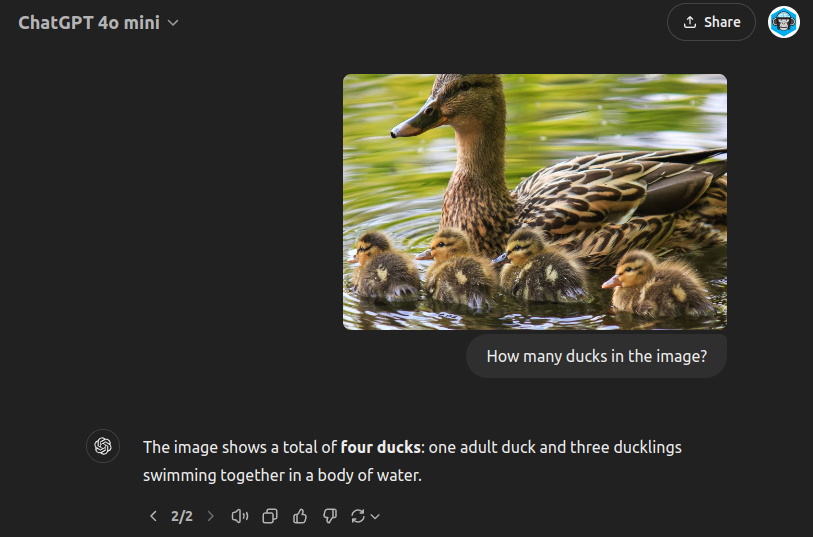
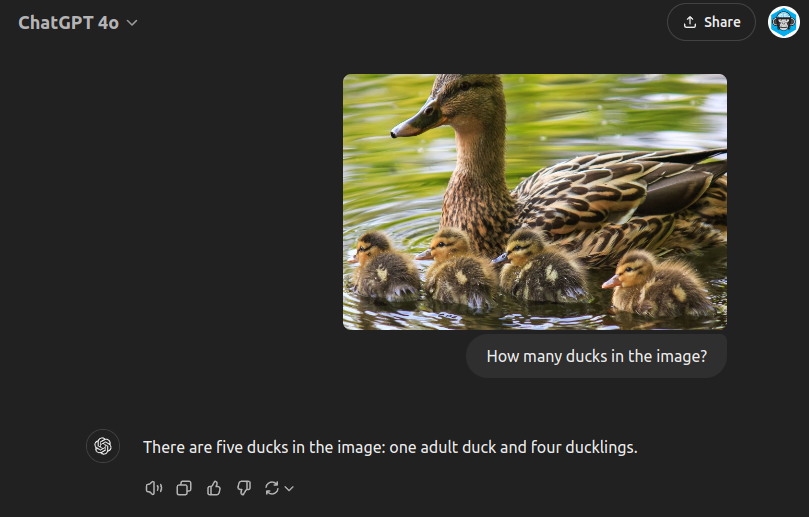
Er – no GPT-4o-mini – there are 5 ducks, you’ve missed a duckling.

However, these models may still find utility in “under-the-bonnet” grunt work tasks within legal workflows, such as initial document sorting or basic information extraction.

Mini models represent an intriguing development in the AI landscape. While they may not be suitable for all aspects of legal work, their speed, efficiency, and cost-effectiveness open up new possibilities for AI integration in various fields. As these models continue to evolve, we may see them taking on increasingly sophisticated roles in complex workflows, complementing rather than replacing their larger counterparts.

Long Contexts: Opportunities and Challenges

The past year has seen a remarkable evolution in the context handling capabilities of large language models. Just a year ago, most models were limited to around 8,000 tokens of input. Now, we’re seeing context windows ranging from 128,000 tokens (as in GPT4o) to 200,000 tokens (Claude 3.5 Sonnet), and even up to 1 million tokens in some mini models like Gemini 1.5 Flash.

Rapid Evolution

This rapid expansion of context windows has opened up new possibilities for AI applications:

  1. Whole Document Analysis: Models can now process entire documents, books, or even small databases in a single pass.
  2. Complex Multi-Step Reasoning: Longer contexts allow for more nuanced, multi-stage problem-solving within a single prompt.
  3. Enhanced Information Retrieval: The ability to search for and synthesize information across vast amounts of text has dramatically improved.

Current State of Long Contexts

  • GPT4o: 128,000 tokens
  • Claude 3.5 Sonnet: 200,000 tokens
  • Mini Models: 128,000 to 1 million tokens (e.g., Gemini 1.5 Flash)

This expansion allows for processing of hundreds of pages of text in a single API call, a capability that was unthinkable just a year ago. GPT4o and Claude 3.5 can also have a mixture of text and images, and Gemini 1.5 Flash can ingest whole videos.

Opportunities

  1. Legal Document Review: Analyzing entire contracts or legal cases in context.
  2. Research Synthesis: Combining and summarizing large volumes of academic papers or reports.
  3. Content Creation: Generating long-form content with consistent themes and references throughout.
  4. Data Analysis: Processing and interpreting large datasets in a single pass.
  5. Patent Prosecution Analysis: An average patent is around 32K-50K tokens. Thus you can theoretically include 4-8 items of prior art in a prompt. This is roughly the amount of cited art in a patent office action.
  6. Patent Family Analysis: You could fit a medium-sized family into Gemini’s context window to ask specific simple questions of the family (e.g., is a feature described? where?). I’d be a bit skeptical of the response but it would be good as a first stage.
  7. A combination of RAG and prompt: RAG was often a solution to the small 4K input context window. It might still be useful as part of a hybrid approach. This could include RAG vector search, BM25 search, and raw LLM review, followed by reranking and reference citing.

Challenges

  1. Computational Costs: Processing such large contexts can be computationally expensive and time-consuming.
  2. Relevance Dilution: With more context, models may struggle to focus on the most relevant information.
  3. Consistency Across Long Outputs: Maintaining coherence and consistency in very long generated texts can be challenging.
  4. Memory Limitations: Even with long input contexts, models can sometimes “forget” earlier parts of the input in their responses.

In practice, I’ve found that you can’t completely trust the output of the models. When modelling a prior art review, both models sometimes got confused between a “claim 1” under review and a “claim 1” as featured in a patent application dumped into the context. I’ve also had it miss simple answers to some questions depending on the sample – e.g. in 1 in 5 runs.

It seems to have promise as part of a traceable and reviewable analysis trail, whereby a human is needed to check the answer and the citation before confirming and moving onto a next stage of review.

The Output Context Limitation

While input contexts have grown dramatically, output contexts remain more limited, typically ranging from 4,000 to 8,000 tokens. This limitation presents a challenge for generating very long documents or responses. To address this, developers and users often need to implement iterative approaches:

  1. Chunked Generation: Breaking down large document generation into smaller, manageable pieces.
  2. Summarisation and Expansion: Generating a summary first, then expanding on each section iteratively.
  3. Context Sliding: Moving a “window” of context through a large document to generate or analyse it piece by piece.
  4. Keeping Track: While generating a small section of the document, keep the other portions of the document being generated, and any relevant information for the small section in the prompt. This is possible with the larger contexts.

Further Work

The advent of long context models represents a significant leap forward in AI capabilities. However, it also brings new challenges in terms of effective utilisation and management of these vast input spaces. The development on the model side has iterated so quickly I’ve found that many developers are caught out a bit, having built systems for limited capabilities, yet finding the goal posts moving rapidly.

Conclusion

As we reflect on the developments in LLMs over the past year, it’s rather striking how quickly the landscape has evolved. From the emergence of capable vision models to the unexpected utility of mini models, and the expansion of context windows, we’ve seen a flurry of advancements that most of the technology world is struggling to keep up with.

The solid foundations provided by models like GPT4o and Claude 3.5 Sonnet offer glimpses of what might be possible in fields such as law and business. Yet, it’s important to remember that these tools, impressive as they may be, are not without their limitations. The challenges of consistency, reliability, and the need for human oversight remain ever-present.

The rise of mini models and the expansion of context windows present intriguing opportunities, particularly in tasks requiring rapid processing of vast amounts of information. However, one ought to approach these developments with a measure of caution, especially in fields where accuracy and nuance are paramount.

In the coming posts, we’ll delve deeper into the technical aspects of implementing these models and explore some of the persistent challenges that we’ve encountered. For now, we’re still very much in the early stages of understanding how best to harness these powerful tools.

Can Long-Context Large Language Models Do Your Job?

In this post we test the abilities of long-context large language models for performing patent analysis. How do they compare with a patent partner charging £400-600 an hour?

Or have I cannibalised my job yet?

Or do we still need Retrieval Augmented Generation?

  1. What is a Long-Context Large Language Model?
    1. Large Language Models (LLMs)
    2. Long Context
  2. What Patent Task Shall We Test?
  3. Top Models – March 2024 Edition
  4. Can I use a Local Model?
  5. How much?
    1. GPT4 Turbo
    2. Claude 3
  6. First Run
    1. Prompts
    2. Getting the Text
    3. Simple Client Wrappers
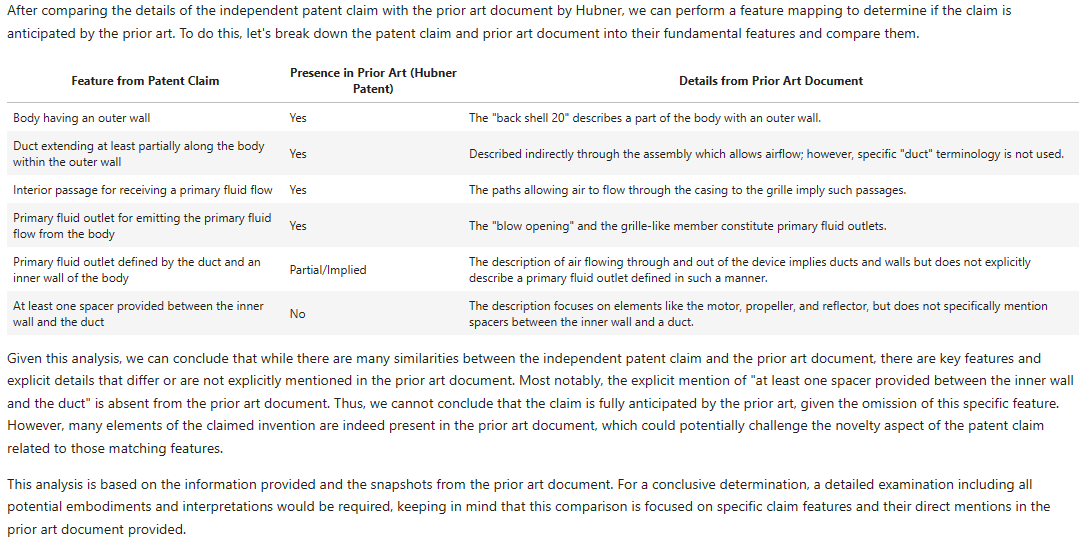
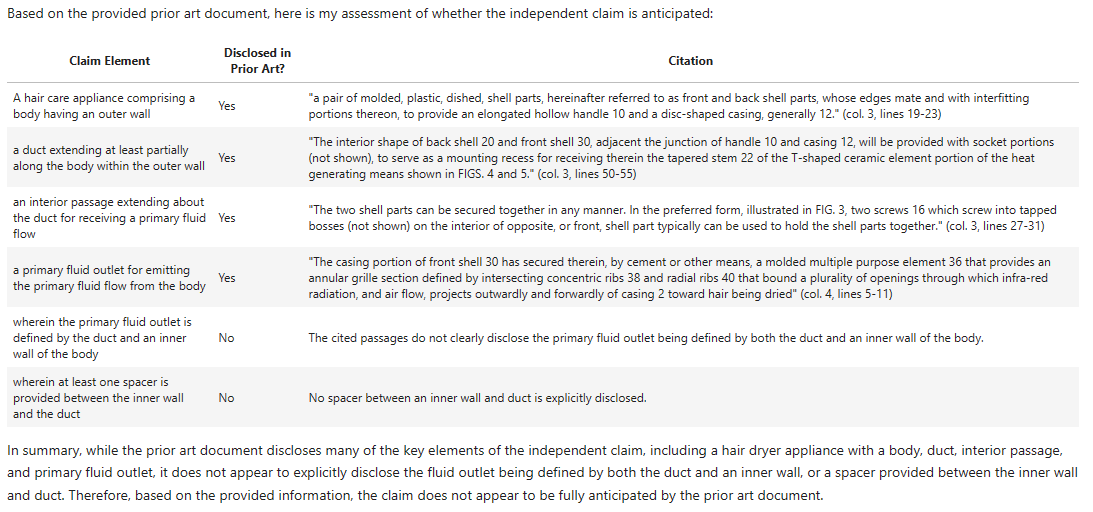
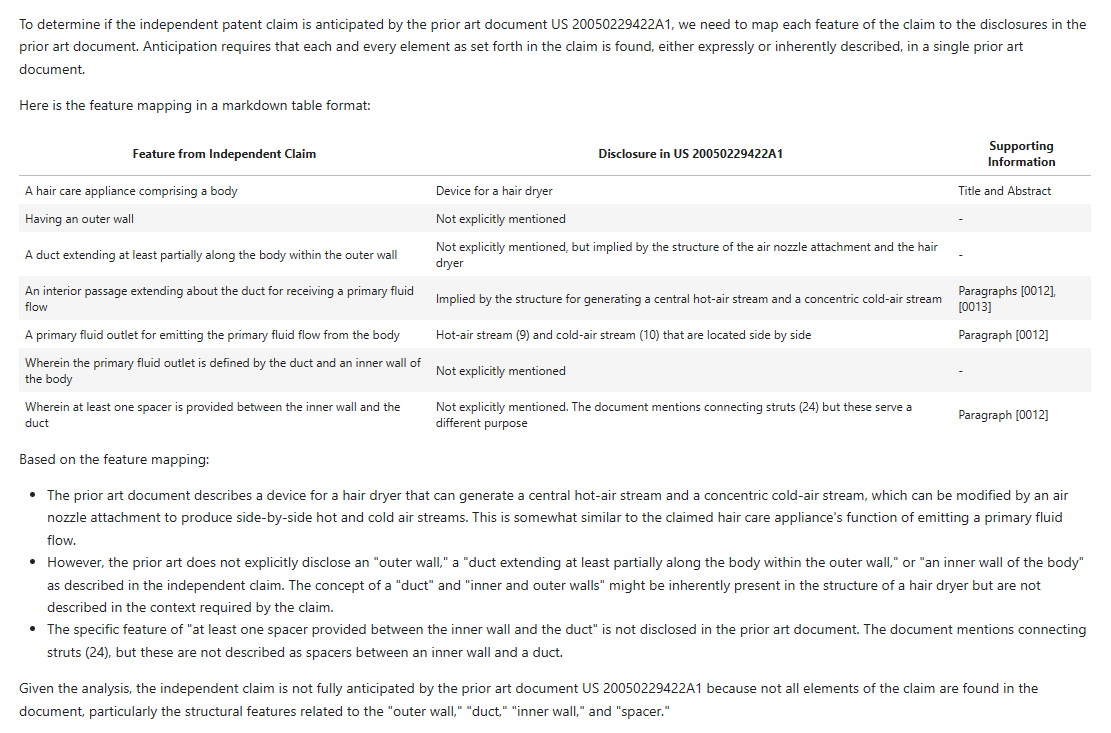
    4. Results
      1. D1 – GPT4-Turbo
      2. D1 – Claude 3 Opus
      3. D1 – First Round Winner?
      4. D2 – GPT4-Turbo
      5. D2 – Claude 3 Opus
      6. D2 – First Round Winner?
  7. Repeatability
  8. Working on the Prompt
  9. Does Temperature Make a Difference?
    1. GPT4-Turbo and D1
      1. Temperature = 0.7
      2. Temperature = 0.1
    2. Claude 3 and D1
      1. Temperature = 0.7
      2. Temperature = 0.1
    3. GPT4-Turbo and D2
      1. Temperature = 0.7
      2. Temperature = 0.1
    4. Claude 3 and D2
      1. Temperature = 0.7
      2. Temperature = 0.1
  10. Failure Cases
    1. Missing or Modified Claim Features
    2. Making Up Claim Features
    3. Confusing Claim Features
  11. Conclusions and Observations
    1. How do the models compare with a patent partner charging £400-600 an hour?
    2. Have I cannibalised my job yet?
    3. Do we still need Retrieval Augmented Generation?
    4. What might be behind the variability?
    5. Model Comparison
  12. Further Work
    1. Vision
    2. Agent Personalities
    3. Whole File Wrapper Analysis
    4. “Harder” Technology

What is a Long-Context Large Language Model?

Large Language Models (LLMs)

Large Language Models (LLMs) are neural network architectures. They are normally based on a Transformer architecture that applies self-attention over a number of layers (~11?). The more capable models have billions, if not trillions, of parameters (mostly weights in the neural networks). The most efficient way to access these models is through a web Application Programming Interface (API).

Long Context

LLMs have what is called a “context window”. This is a number of tokens that can be ingested by the LLM in order to produce an output. Tokens are roughly mapped to words (the Byte-Pair Encoding – BPE – tokeniser that is preferred by most models is described here – tokens are often beginnings of words, word bodies, and word endings).

Early LLMs had a context of ~512 tokens. This quickly grew to between 2000 and 4000 tokens for commercially available models in 2023. Context is restricted because the Transformer architecture performs its matrix computations over the context; the size of the context thus fixes the size of certain matrix computations – the longer the context, the more parameters and the larger the matrices involved.

In late 2023/early 2024, a number of models with long context emerged. The context window for GPT3.5 quickly extended to 8k, then 16k, then 32k. This was then followed later in 2023 by a longer 32k context for the more capable GPT4 model, before a 128k context window was launched in November 2023 for the GPT4-Turbo model.

(Note: I’ve often found a lag between the “release” of models and their accessibility to Joe Public via the API – often a month or so.)

In January 2024, we saw research papers documenting input contexts of up to a million tokens. These appear to implement an approach called ring attention, that was described in a paper in October 2023. Anthropic AI released a model called Opus in March 2024 that appeared comparable to GPT4 and had a stable long context of 200k tokens.

We thus seem to be entering a “long context” era, where whole documents (or sets of documents) can be ingested.

What Patent Task Shall We Test?

Let’s have a look at a staple of patent prosecution: novelty with respect to the prior art.

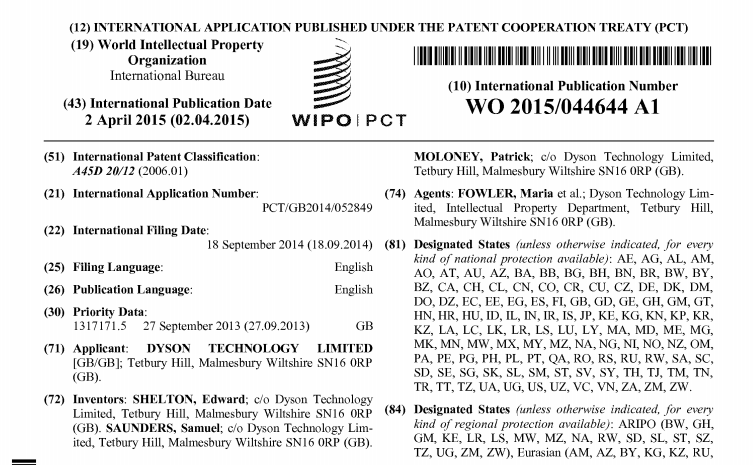
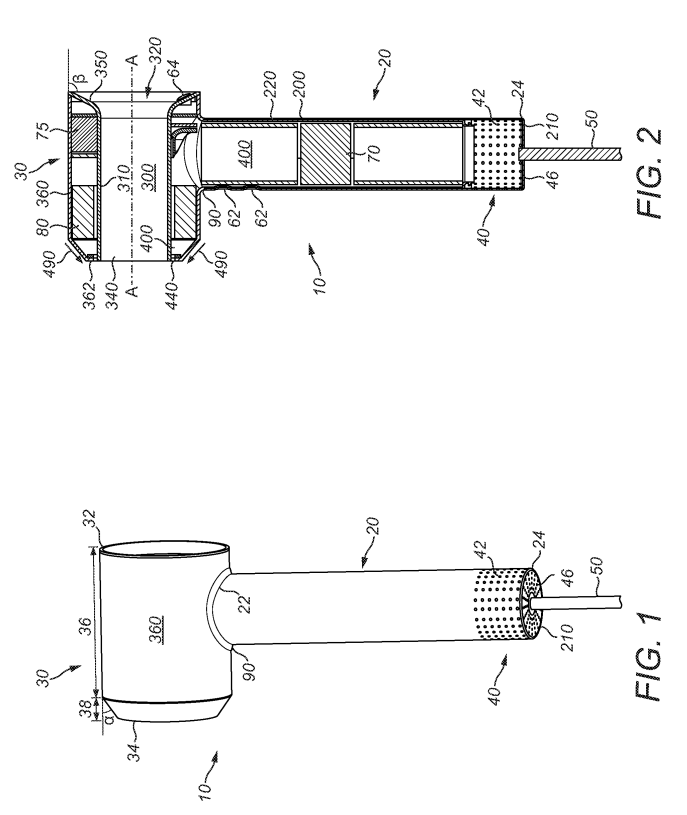
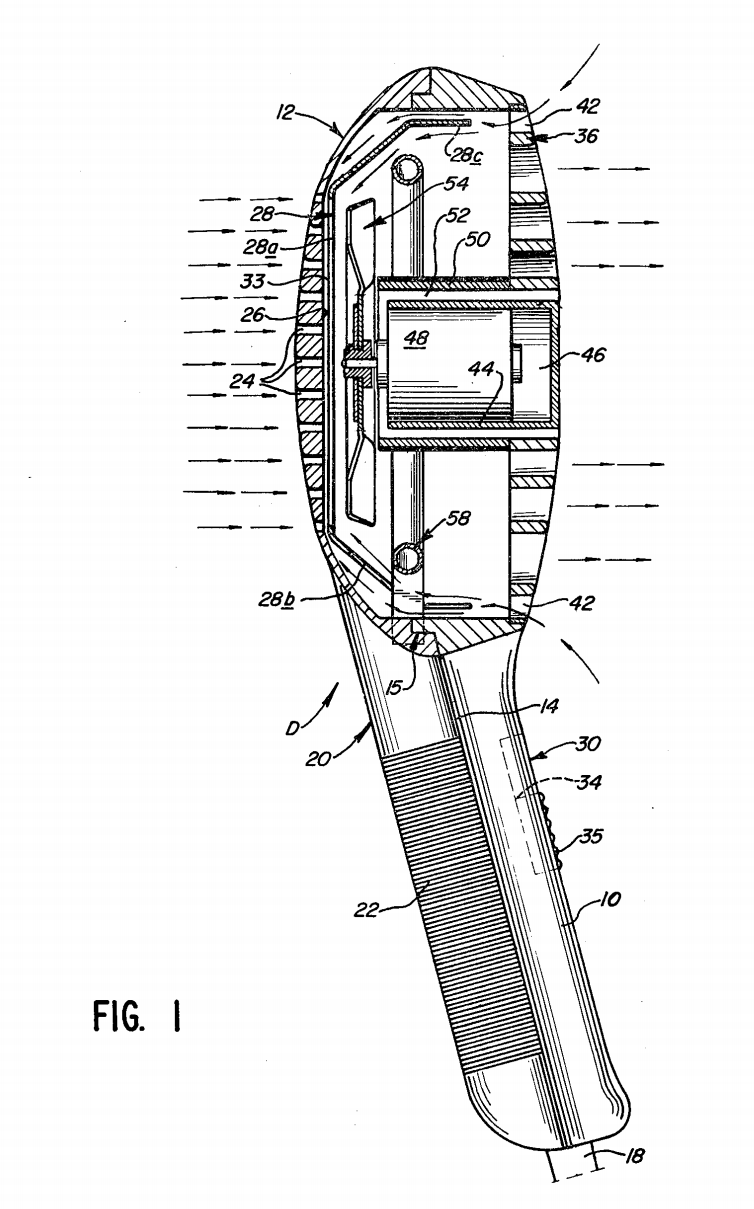
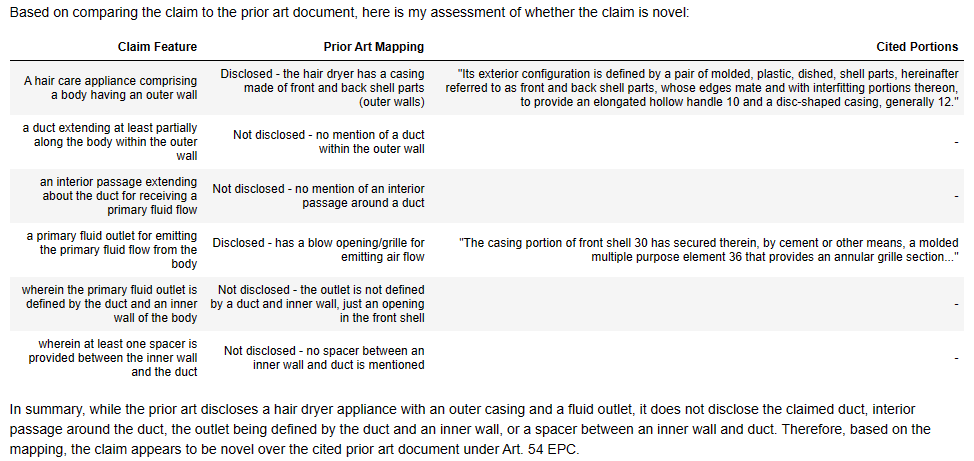
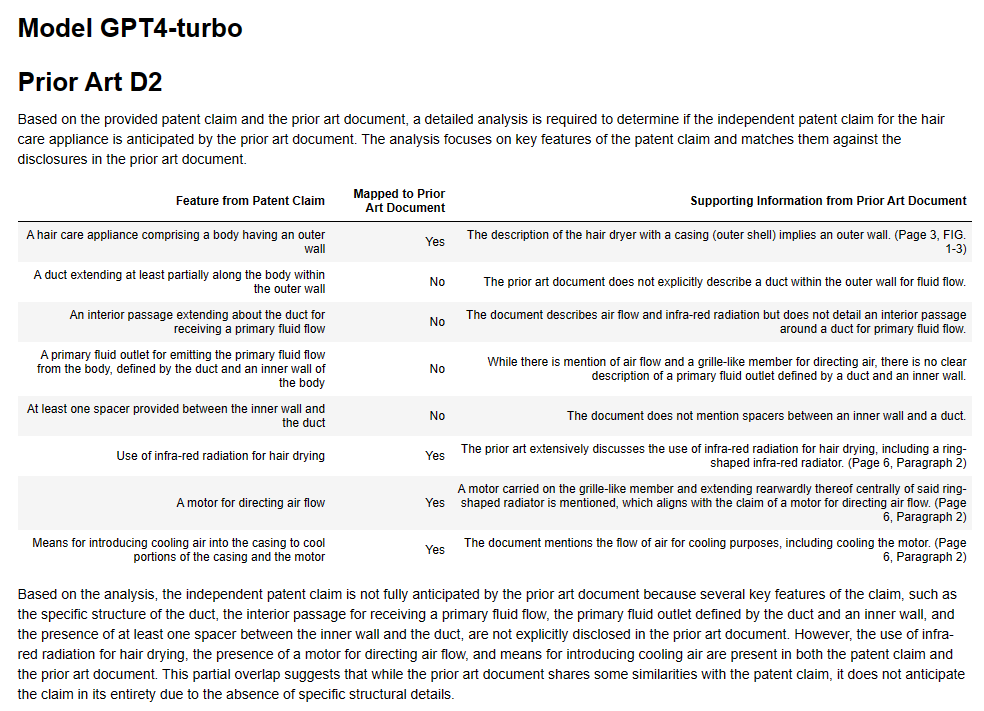
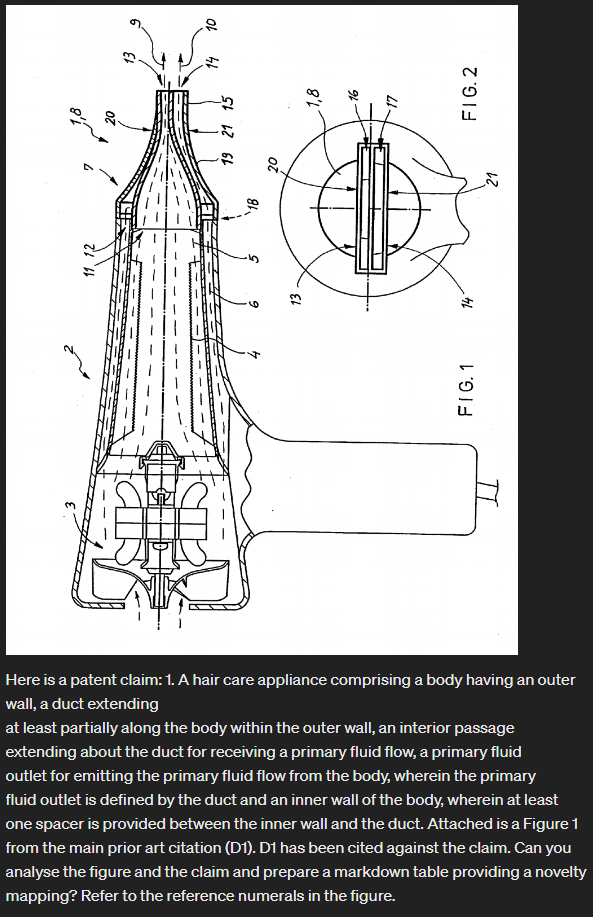
Let’s start reasonably easy with a mechanical style invention. I’ve randomly picked WO2015/044644 A1 from the bucket of patent publications. It’s a Dyson application to a hair dryer (my tween/teenage girls are into hair these days). The prior art citations are pretty short.

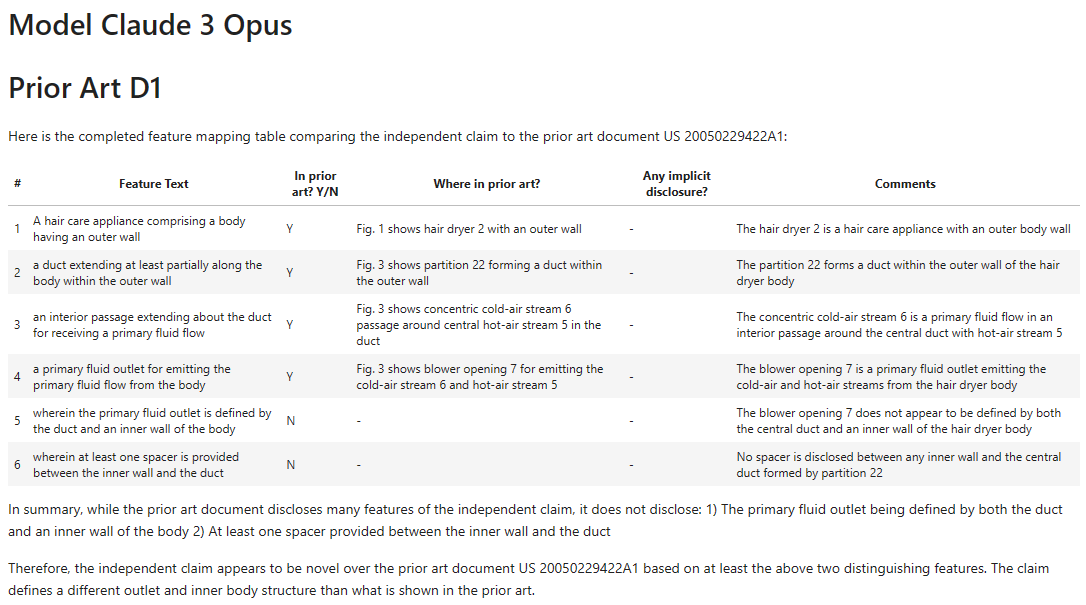
  1. A hair care appliance comprising a body having an outer wall, a duct extending
    at least partially along the body within the outer wall, an interior passage
    extending about the duct for receiving a primary fluid flow, a primary fluid
    outlet for emitting the primary fluid flow from the body, wherein the primary
    fluid outlet is defined by the duct and an inner wall of the body, wherein at least
    one spacer is provided between the inner wall and the duct.
Claim 1

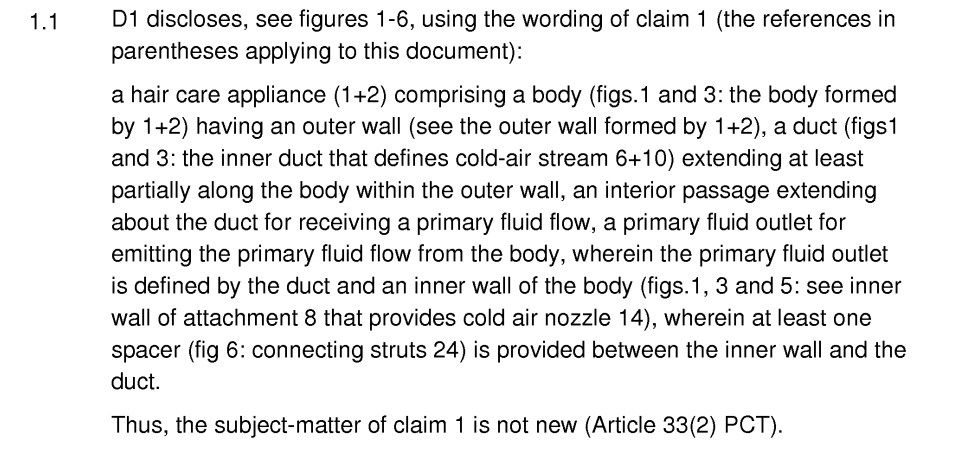
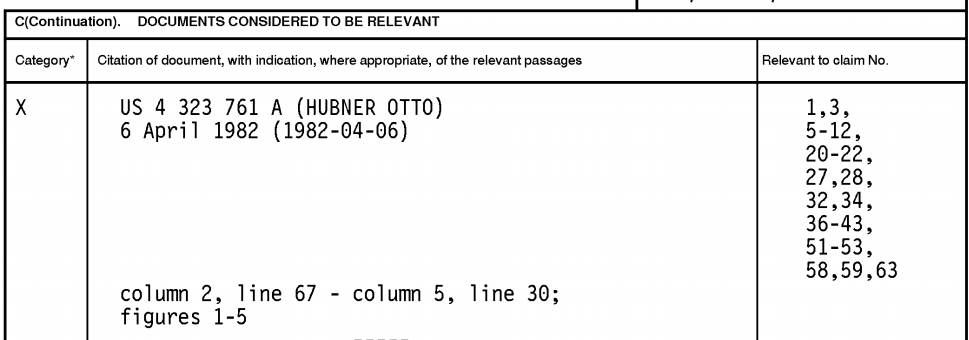
In the International phase we have three citations:

D1 and D2 are used to support a lack of novelty, so we’ll look at them.

Note: we will not be looking at whether the original claim is or is not novel from a legal perspective. I have purposely not looked into anything in detail, nor applied a legal analysis. Rather we are looking at how the language models compare with a European Examiner or Patent Attorney. The European Examiner may also be incorrect in their mapping. As we know, LLMs can also “hallucinate” (read: confabulate!).

Top Models – March 2024 Edition

There are two:

  • GPT4-turbo; and
  • Claude 3 Opus.

These are the “top” models from each of OpenAI and Anthropic. I have a fair bit of experience with GPT3.5-Turbo, and I’ve found anything less than the “top” model is not suitable for legal applications. It’s just too rubbish.

For the last year (since April 2024), GPT4 has been the king/queen, regularly coming 10-20% above other models in evaluations. Nothing has been close to beating it.

GPT4-turbo performs slightly worse that GPT4, but it’s the only model with a 128k token context. It is cheaper and quicker than GPT4. I’ve found it good at producing structured outputs (e.g., nice markdown headings etc.) and at following orders.

Claude 3 Opus has a 200k token context and is the new kid on the block. The Opus model is allegedly (from the metrics) at the level of GPT4.

It’s worth noting we are looking at the relatively bleeding edge of progress here.

  • GPT4-turbo was only released on 6 November 2023. On release it had certain issues that were only resolved with the 25 January 2024 update. We will use the 25 January 2024 version of the model. I’ve noticed this January model is better than the initially released model.

Can I use a Local Model?

Short answer: no.

Longer answer: not yet.

There are a couple of 1 million token models available. See here if you are interested. I tried to run one locally.

It needed 8.8TB of RAM. (My beefy laptop has 64GB RAM and 8GB VRAM – only short 8724GB.)

Progress though is super quick in the amateur LLM hacking sphere (it’s only big matrix multiplication in an implementation). So we might have an optimised large context model by the end of the year.

Also I’ve found the performance of the “best” open-source 7B parameter models (those that I can realistically run on my beefy computers) is still a long way away from GPT4, more GPT3.5-Turbo level, which I have found “not good enough” for any kind of legal analysis. Also, I’ve found open-source models to be more tricky to control to get appropriate output (e.g., doing what you ask, keeping to task etc.).

How much?

You have to pay for API access to GPT4-Turbo and Claude 3. It’s not a lot though, being counted in pence for each query. I’ve found it’s worth paying £5-10 a month to do some experiments on the top models.

Here are some costings based on the patent example above, that has two short prior art documents.

The claim is around 100 tokens. The prior art documents (D1 and D2) are around 3000 and 6000 tokens. Throw in a bundle of tokens for the input prompts and you have around 9200 tokens input for two prior art documents.

On the output side, a useful table comparing a claim with the prior art is around 1500 tokens.

GPT4 Turbo

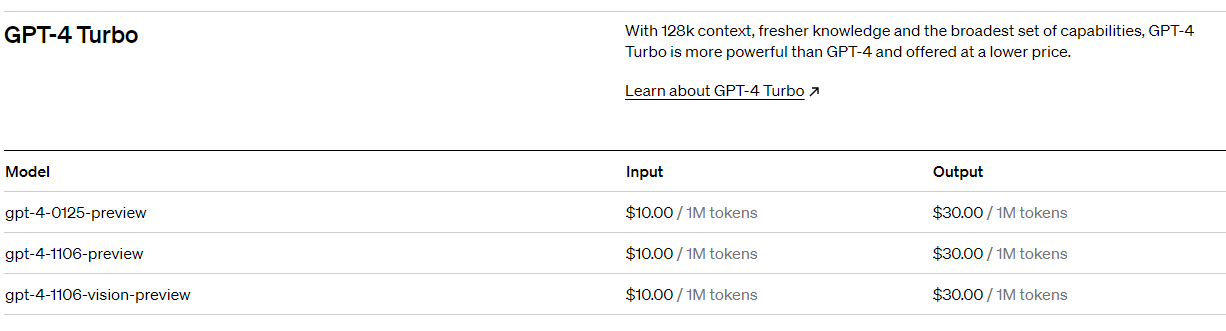
GPT4-Turbo has a current pricing of $10/1M tokens on the input and $30/1M tokens on the output. So we have about 10 cents ($0.092) on the input and about 5 cents on the output ($0.045). Around 15 cents in total (~12p). Or around 1s (!!!) of chargeable patent partner time.

Claude 3

The pricing for Claude is similar but a little more expensive – $15/1M on the input and $75/1M on the output (reflecting the alleged more-GPT4 than GPT4-Turbo level).

So we have about 15 cents ($0.138) on the input and about 15 cents on the output ($0.1125). Around 30 cents in total (~24p). Or around 2s (!!!) of chargeable patent partner time.

These costs are peanuts compared to the amounts charged by attorneys and law firms. It opens up the possibility of statistical analysis, e.g. multiple iterations or passes through the same material.

First Run

For our experiments we will try to keep things as simple as possible. To observe behaviour “out-of-the-box”.

Prompts

For a system prompt I will use:

You are a patent law assistant.

You will help a patent attorney with patent prosecution.

Take an European Patent Law perspective (EP).

As our analysis prompt scaffold I will use:

Here is an independent patent claim for a patent application we are prosecuting:    
---
{}
---

Here is the text from a prior art document:
---
{}
---

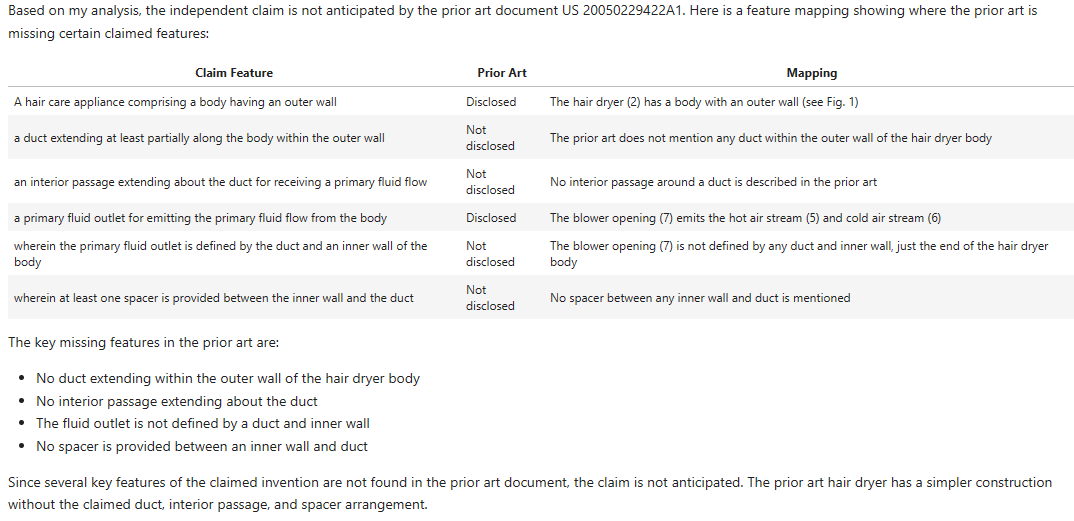
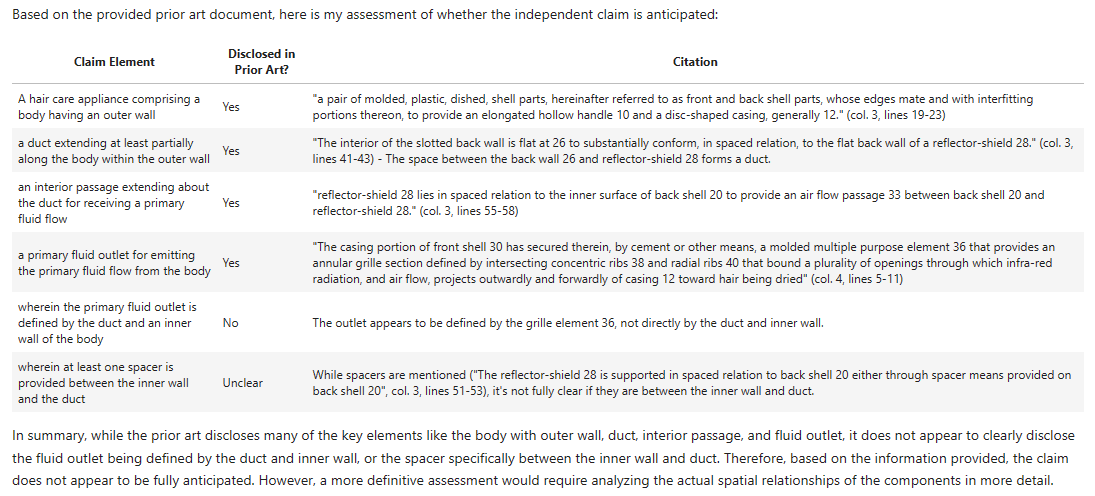
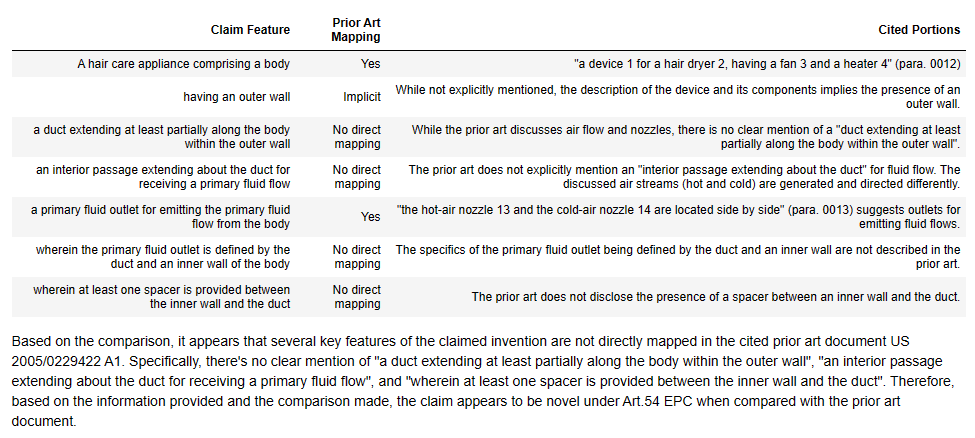
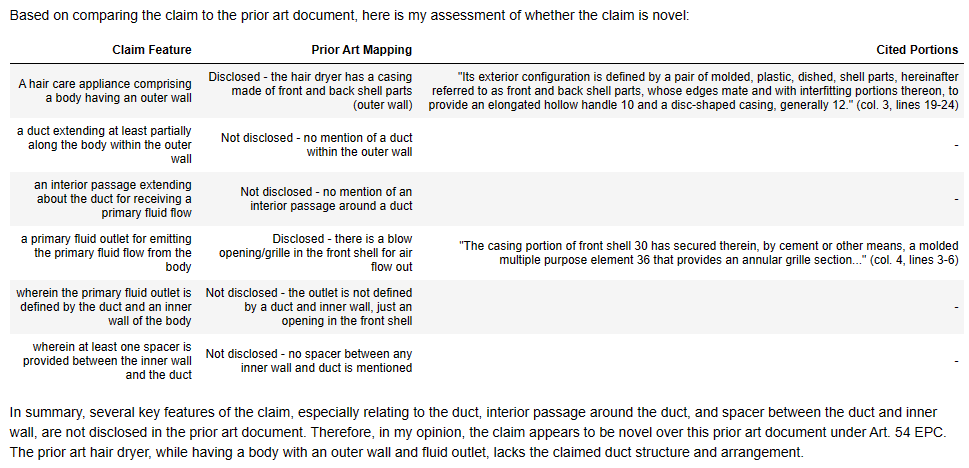
Is the claim anticipated by the prior art document?
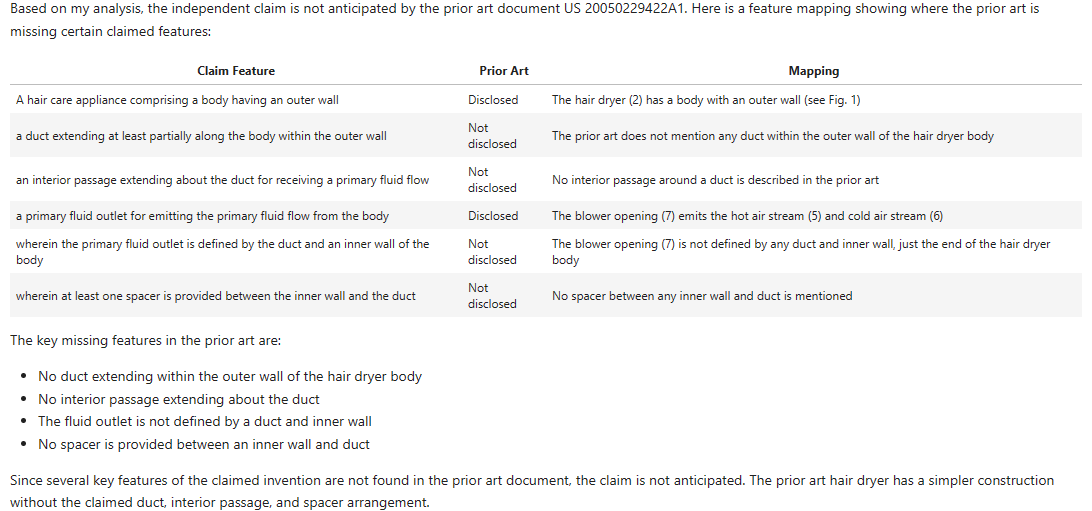
* Return your result with a markdown table with a feature mapping
* Cite paragraph numbers, sentence location, and/or page/line number to support your position
* Cite snippets of the text to demonstrate any mapping

The patent claim gets inserted in the first set of curly brackets and the prior art text gets inserted in the second set of curly brackets.

We will use the same prompts for both models. We will let the model choose the columns and arrangement of the table.

Getting the Text

To obtain the prior art text, you can use a PDF Reader to OCR the text then save as text files. I did this for both prior art publication PDFs as downloaded from EspaceNet.

  • You can also set up Tesseract via a Python library, but it needs system packages so can be fiddly and needs Linux (so I sometimes create a Docker container wrapper).
  • Python PDF readers are a little patchy in my experience. There are about four competing libraries with stuff folding and being forked all over the place. They can struggle on more complex PDFs. I think I use pyPDF. I say “I think” because you did have to use pyPDF2, a fork of pyPDF, but then they remerged the projects, so pyPDF (v4) is a developed version of pyPDF2. Simples, no?
  • You can also use EPO OPS to get the text data. But this is also a bit tricky to set up and parse.
  • It’s worth noting that the OCRed text is often very “noisy” – it’s not nicely formatted in any way, often has missing or misread characters, and the whitespace is all over the place. I’ve traditionally struggled with this prior to the LLM era.

The claim text I just copied and pasted from Google patents (correctness not guaranteed).

Simple Client Wrappers

Nothing fancy to get the results, just some short wrappers around the OpenAI and Anthropic Python clients:

def compare_claim_with_prior_art_open_ai(claim: str, prior_art: str, system_msg: str = SYSTEM_PROMPT, model: str = OPENAI_MODEL):
"""Get the chat based on a user message."""
completion = openai_client.chat.completions.create(
model=model,
messages=[
{"role": "system", "content": system_msg},
{"role": "user", "content": PROMPT_SCAFFOLD.format(claim, prior_art)}
],
temperature=0.3
)
return completion.choices[0].message.content

def compare_claim_with_prior_art_anthropic(claim: str, prior_art: str, system_msg: str = SYSTEM_PROMPT, model: str = ANTHROPIC_MODEL):
"""Get the chat based on a user message."""
message = anthropic_client.with_options(max_retries=5).messages.create(
model=model,
max_tokens=4000,
temperature=0.3,
system=SYSTEM_PROMPT,
messages=[
{"role": "user", "content": PROMPT_SCAFFOLD.format(claim, prior_art)}
]
)
return message.content[0].text

Results

(In the analysis below, click on the images if you need to make the text bigger. Tables in WordPress HTML don’t work as well.)

D1 – GPT4-Turbo

Here’s GPT4-Turbo first off the blocks with D1:

Let’s compare again with the EP Examiner:

Successes:

  • hair care appliance” – yes, gets this and cites the same objects as the EP Examiner (actually does a better job of referencing but hey ho).
  • spacer” – while GPT4-Turbo says this is not “explicitly mentioned”, it does cite the “struts 24”, which are the same features cited by the EP Examiner.

Differences:

  • outer wall” – deemed to be not explicitly present – doesn’t make the jump made by the EP Examiner to find this feature implicit in the structure of the “hair dryer 2”.
  • duct…within the outer wall” – GPT4-Turbo decides to cite an inner hot air passageway formed by the fan 3 and heater 4 – on a brief look this seems possibly valid in isolation. However, there is an argument that it’s the outer passageway 12 that better extends within the outer wall.
  • interior passage” – GPT4-Turbo can’t find this explicitly mentioned. Interestingly, the EP Examiner doesn’t cite anything directly to anticipate this feature, so we can maybe assume it is meant to be implicit?
  • primary fluid flow outlet” – GPT4-Turbo cites the “blower opening 7”, which is an fluid outlet.
  • primary fluid flow outlet defined by the duct and an inner wall of the body” – GPT4-Turbo says this is implicit saying it is defined by “inner structures”. It’s not the most convincing but looking at the picture in Figure 1, it could be argued. I do think the EP Examiner’s “cold air nozzle” is a bit of a better fit. But you could possible argue both?

We will discuss this in more detail in the next section, but for now let’s also look at Claude 3…

D1 – Claude 3 Opus

Now let’s see how new kid, Opus, performs:

Successes:

  • hair care appliance” and “outer wall” – yes, gets this and cites the same objects as the EP Examiner (actually does a better job of referencing but hey ho).
  • primary fluid outlet” – hedges its bets by referring to both the hot and cold air streams but slightly better matches the EP Examiners citation.

Differences:

  • duct…within the outer wall” – Claude 3’s a bit more bullish than GPT4-Turbo, announcing this is not disclosed. I’d warrant that there’s more evidence for it being disclosed than not disclosed so would side more with the EP Examiner than Claude.
  • interior passage” – Again, whereas GPT4-Turbo was a little more tentative, Claude 3 appears more confident in saying this is not disclosed. I don’t necessarily trust its confidence but as before the EP Examiner is silent on what explicitly anticipates this feature.
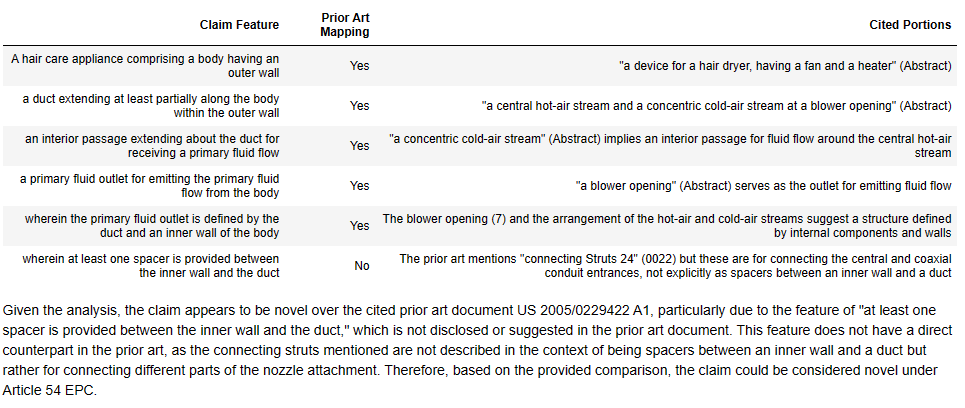
  • primary fluid flow outlet defined by the duct and an inner wall of the body” – Claude 3 here says it is not disclosed, but I don’t thing this is entirely right.
  • “spacer” – Claude 3 says this isn’t disclosed and doesn’t mention the “struts 24”.

D1 – First Round Winner?

I’d say GPT4-Turbo won that round for D1.

It didn’t entirely match the EP Examiner’s mapping, but was pretty close.

Both models were roughly aligned and there was overlap in cited features.

I’d still say the EP Examiner did a better job.

Let’s move onto D2.

D2 – GPT4-Turbo

Here’s what the EP Examiner said about D2:

Helpful. Here’s the search report:

Also helpful.

Here’s Figure 1:

And here’s the results:

Successes:

  • body having an outer wall” – yes, in isolation this can be argued.
  • duct” – does say this appears to be present but does indicate the word “duct” is not explicitly used (CTRL-F says: “correct”).
  • interior passage” – GPT4-Turbo cites the flow “through the casing to the grille”, where the casing is 12 in Figure 1 and the grill is 24 (using those would help GPT4-Turbo!). This I think can be argued in isolation.
  • primary fluid outlet” – lines 50 to 60 of column 2 do refer to a “blow opening” as quoted and the “primary fluid flow” does go from the grille to the “blow opening”. Good work here.

Differences / Failures:

  • A hair care appliance” has gone walkabout from the claim features.
  • …defined by the duct and an inner wall” – GPT4-Turbo says this is not explicitly disclosed but does take a guess that it is implicitly disclosed. I would like some more detailed reasoning about what features could stand in for the duct and inner wall. But I’d also say the GPT4-Turbo is not necessarily wrong. In the Figure 1, there is a “air flow passage 33” between the “back shell 20” and the “reflector-shield 28”, which could be mapped to a “duct” and an “inner wall”?
  • spacer” – GTP4-Turbo can’t find this. If you mapped the “air flow passage 33” to the “duct”, “spacers” may be implicit? A discussion on this and its merits would be useful. Checking D2, I see there is explicit disclosure of “spacer means” in line 55 of column 3. I’m surprised this is absent.

D2 – Claude 3 Opus

Successes:

  • hair care appliance” and “outer wall” – yes, although I think GPT4-Turbo’s “back shell 20” is better.
  • primary fluid outlet” – yes, I think element 36 and the front “grille” can be argued in isolation to be a “primary fluid outlet”

Differences / Failures:

  • duct” – Claude 3 does say this is present but the cited text isn’t amazingly useful, despite being from the document. It’s not clear what is meant to be the “duct”. However, it is true you could argue something within the back and front shell is a duct.
  • “interior passage” – similar to “duct” above. Claude 3 says it is present but the text passage provided, while from the document, doesn’t seem entirely relevant to the claim feature.
  • definition of “primary fluid outlet” – Claude’s 3 reasoning here seems appropriate if you have the molded “multiple purpose element 36” as the “primary fluid outlet” but there is maybe room to argue “periphery openings 42” help define the “element 36”? Definitely room for a discussion about whether this feature is present.
  • “spacer” – as per GPT4-Turbo, Claude 3 says this is not present despite there being “spacer means” in line 55 of column 3.

D2 – First Round Winner?

GPT4-Turbo and Claude 3 both do a little less well on the twice-as-long D2.

They do have the disadvantage of not being able to use the figures (*yet*).

Their lack of discussion of the “air flow passage 33” formed from “openings 42” is a little worrying. As is their ignorance of the “spacer means” in line 55 of column 3.

Patent attorney and EP Examiner win here.

Repeatability

As I was running some tests (coding is iterative, you fail, then correct, then fail, then correct until it works), I noticed that there was a fair bit of variation in the mapping tables I was getting back from both models. This is interesting as a human being would expect a mapping to be relatively stable – the claims features are either anticipated, or they are not.

Here’s GPT4-Turbo again on D1:

Here’s the previous run:

We can see the following issues:

  • In the first analysis GPT4-Turbo thought the “outer wall” was disclosed. In the second run, it said it was not explicitly mentioned.
  • Also note how we have slightly different “features” for each run, and differing columns and formats.
  • The mapping for the “duct” is also different, with differently levels of “confidence” on the presence and the possible implicit features.
  • On the first run, GPT4-Turbo though the “interior passage” was “not explicitly mentioned” but on the second run thought it was implied by structures and provided paragraph references.
  • Different features are mapped to the “primary fluid outlet”.
  • It locates the “struts 24” on both runs but on the first run thinks they are “functionally similar”, while on the second run finds them to “serve a different purpose”.

Uh oh. We have quite a different mapping each time we perform the run.

Let’s look at running Claude 3 again:

As compared to the previous run:

Claude 3 seems slightly more consistent between runs. We can see that the columns have shifted around, and I don’t necessarily agree with the mapping content, but the mapping detail seems mostly conserved.

Let’s look at another run for Claude 3 on D2:

Here Claude 3 does much better than the first run. The citation column appears more relevant. And party-time, it’s found and mentioned the “spacer means”. The “interior passage” mapping is better in my opinion, and is more reflectively of what I would cite in isolation on a brief run through.

Working on the Prompt

Maybe we can overcome some of these variability problems by working on the prompt.

It may be that the term “anticipated” is nudging the analysis in a certain, more US centric, direction. Let’s try explicitly referencing Article 54 EPC, which is more consistent with us setting a “European Patent Law perspective” in the system prompt.

Also let’s try shaping the mapping table, we can specify columns we want filled in.

Here’s then a revised prompt:

Here is an independent patent claim for a patent application we are prosecuting:
---
{}
---

Here is the text from a prior art document:
---
{}
---

Is the claim novel under Art.54 EPC when compared with the prior art document?
* Return your result with a markdown table with a feature mapping
* Cite paragraph numbers, sentence location, and/or page/line number to support your position
* Cite snippets of the text to demonstrate any mapping

Here is the start of the table:
| # | Feature Text | In prior art? Y/N | Where in prior art? | Any implicit disclosure? | Comments |
|---| --- | --- | --- | --- | --- |

Does that help?

In short – not really!

GPT4-Turbo seems to do a little worse with this new prompt. It appears more certain about the mapping – e.g. the “duct” is deemed not in the prior art (“N”), with no implicit disclosure and simply a statement that “The prior art does not explicitly describe a duct within the outer wall of the body”. This can be compared to the first run where this was deemed present “indirectly”.

GPT4-Turbo also introduces an error into the claim mapping, which we discuss later below.

Even though we specify more columns, the amount of text generated appears roughly the same. This means that for both models our reasoning is a bit shorter, and the models tend towards more fixed statements of presence or, more often, non-presence.
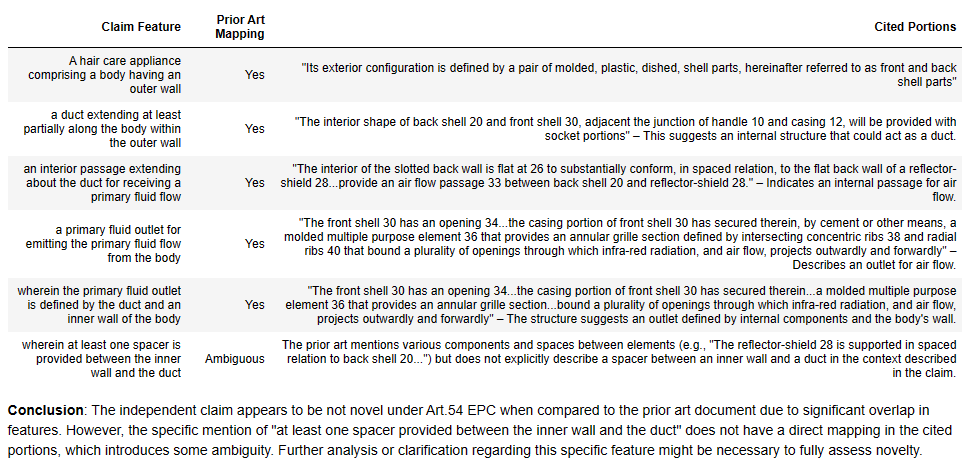
Also, although our “In prior art? Y/N” column provides a nice single letter output we can parse into a structured “True” or “False”, it does seem to nudge the models into a more binary conclusion. For example, the comments tend to confirm the presence conclusion without additional detail, whereas when the model was able to pick the columns, there was a longer, more useful discussion of potentially relevant features.

I had hoped that the “Any implicit disclosure” column would be a (sub) prompt for considering implicit disclosures a bit more creatively. This doesn’t seem to be the case for both models. Only Claude 3 uses it once in the D2 mapping (although it does use it there in the way I was hoping). I think we will ditch that column for now.

This little experiment suggests that keeping any mapping table as simple as possible helps improve performance. It also shows that LLM-wrangling is often as much of an art as a science.

Does Temperature Make a Difference?

Temperature is a hyperparameter that scales the logits output by the model prior to sampling the probabilities. This is a nice explanation. Or in English, it controls how “deterministic” or “random” the model output is. Values of around 0.1 / 0.2 should have pretty consistent output without much variation, values around and above 1 will be a lot more “creative”.

I general use a temperature of somewhere between 0.3 and 0.7. I have found that higher temperatures (around 0.7) are sometimes better for logical analysis where a bit of “thinking outside the obvious” is required.

Let’s go back to a three column table with “Claim Feature”, “Prior Art Mapping”, and “Cited Portions”. Let’s then run a round with a temperature of 0.7 and a temperature of 0.1. We will at least keep the prompt the same in both cases.

From the experiments above, it may be difficult to determine the effect of temperature over and above variability inherent in the generating of responses, but let’s have a look anyway.

(Those with a proper science degree look away.)

GPT4-Turbo and D1

Temperature = 0.7

Temperature = 0.1

There doesn’t actually seem to be that much difference between the mappings here, apart from that underlying variability discussed before.

It may be that with the temperature = 0.7 run, the model is freer to diverge from a binary “yes/no” mapping.

In the temperature = 0.1 run, GPT4-Turbo has actually done pretty well, matching the EP Examiner’s conclusions on all features apart from the last feature (but at least indicating what could be mapped).

Claude 3 and D1

Temperature = 0.7

Temperature = 0.1

Here we can again see that Claude 3 seems more consistent between runs. While there are some small differences, the two runs are very similar, with often word-for-word matches.

Claude 3 does well here, pretty much matching the EP Examiner’s objection in both cases.

GPT4-Turbo and D2

Temperature = 0.7

Temperature = 0.1

Here we can see the variation of the GPT4-Turbo. With one mapping, all the features are found in the prior art; with the other mapping, nearly all the features are not found in the prior art. Which to believe?!

Claude 3 and D2

Temperature = 0.7

Temperature = 0.1

Again Claude 3 seems much more consistent across runs. But I’m not that impressed with the reasoning – e.g. compare these to the “good” GPT4-Turbo run above.

So in conclusion, temperature doesn’t seem to make a load of difference here. It is not a silver bullet, transforming “bad” mappings into “good”. The issues with performance and consistency appear to be model, rather than hyperparameter based.

Failure Cases

Missing or Modified Claim Features

With GPT4-Turbo there was a case where the claim features did not entirely sync up with the supplied claim text:

Here “[a] hair care appliance comprising” has gone walk-about.

Also GPT4-Turbo seems to paraphrase some of the claim features in the table.

The feature “an interior passage extending about the duct for receiving a primary fluid flow” becomes “interior passage for receiving a primary fluid flow“. Such paraphrasing by a trainee would give senior patent attorneys the heebie-jeebies.

Making Up Claim Features

This is an interesting failure case from GPT4-Turbo. It appears to get carried away and adds three extra claim features to the table. The claim doesn’t mention infra-red radiation anywhere…

As with the case below, it seems to be getting confused with the “claim 1” we are comparing and the “claim 1” of the prior art. It is interesting to note this occurs for the longer prior art document. It is a nice example of long document “drift”. I note how RAG offers a solution to this below.

I found similar behaviour from GPT3.5-turbo. GPT3.5-turbo was a lot worse, it often just made up the claim features, or decided to take them from the comparison text instead of the claim. Similar to if you gave the exercise to a 6 year-old.

Confusing Claim Features

Here Claude 3 does what at first site looks like a good job. Until, you realise the LLM is mapping what appears to be a claim from the prior art document, onto the prior art document.

This may be an issue I thought we’d might see in long context models. In the prompt we put the claim we are comparing first. But then we have 6000 tokens from D2. It looks like this might cause the model to “forget” the specific text of the claim but “remember” that we are mapping some kind of “claim” and so pick the nearest “claim” – claim 1 of D2.

Looking at the claim 1 of D2 this does appear to be the case:

In a hand held hair dryer having means for directing air flow toward hair to be dried, the improvement comprising, in combination:
a casing having a forward grille-like support member adapted to be faced toward the hair to be dried;
an infra-red, ring-shaped, radiator in said casing spaced rearwardly of the grille-like member;
a motor carried on the grille-like member and extending rearwardly thereof centrally of said ring shaped radiator;
shield means between the ring-shaped radiator and the motor for protecting the motor from the infrared radiation; radiation reflector means, including a portion spaced rearwardly of the ring-shaped radiator for directing reflected radiation toward and through the grille-like member;
a flat air propeller operatively associated with and driven by the motor and located spaced axially formed of the rearward portion of the reflector and rearward of the ring-shaped radiator, the propeller being operative to direct only a gentle flow of air through said grille toward the hair to be dried, to avoid destruction and disarray of the hairdo, but to move the top layers of hair sufficiently to permit radiation drying of the hair mass; and
means for introducing cooling air into the casing to cool portions of the casing and the motor.

Claim 1 of D2

It’s interesting to note that this was also a problem we found with GPT3.5-Turbo.

Conclusions and Observations

What have we found out?

  • Results are at a possibly-wrong, average-ability, science-graduate level.
  • Prompt crafting is an art – you can only learn by doing.
  • Temperature doesn’t matter that much.
  • Variability is a problem with GPT4-Turbo.
  • LLMs can get confused on longer material.

At the start we had three questions:

  1. How do the models compare with a patent partner charging £400-600 an hour?
  2. Have I cannibalised my job yet?
  3. Do we still need Retrieval Augmented Generation?

Let’s see if we can partially answer them.

How do the models compare with a patent partner charging £400-600 an hour?

Ignoring cost, we are not there yet. Patent attorneys can sigh in relief for maybe another year.

But considering the models cost the same as 1-2s of patent partner time, they didn’t do too bad at all.

One big problem is consistency.

GPT4-Turbo has some runs and some feature mappings that I am fairly happy with. The problem is I perform a further run with the same prompt and the same parameters and I get a quite different mapping. It is thus difficult to “trust” the results.

Another big problem is apparent confidence.

Both models frequently made quite confident statement on feature disclosure. “This feature is not disclosed”. However, on the next mapping run, or by tweaking the prompt, the feature was found to be disclosed. So the confident statements are more features of the output. The models don’t seem to do accurate shades of confidence out-of-the-box.

If you are a skeptical person like myself, you might not believe what you are told by human or machine (watch the slide into cynicism though). In which case, you’d want to see and review the evidence for any statement yourself before agreeing. If you treat LLMs in this manner, like a brand new graduate trainee, sometimes helpful, sometimes off, then you are well placed.

If you are a nice trusting human being that thinks that both human beings and machines are right in what they say, you will come to harm using LLMs. LLMs are particularly slippery because they provide the most likely, not the most factually correct, output. While the two are correlated, correlation does not necessarily equal truth (see: science).

Often, a clear binary mapping (“Yes – the feature is disclosed”) leads the model to later justify that sampling (“The feature is disclosed because the feature is disclosed”) rather than provide useful analysis. We had better performance when we were less explicit in requiring a binary mapping. However, this then leads to problems in parsing the results – is the feature disclosed or not?

Have I cannibalised my job yet?

Not quite.

But if I needed to quickly brainstorm mappings for knocking out a claim (e.g., in an opposition), I might run several iterations of this method and look at the results.

Or if I was drafting a claim, I could “stress test” novelty against known prior art by iterating (e.g. 10-20 times?) and looking at the probabilities of feature mappings.

If neither model can map a feature, then I would be more confident in the robustness in examination. These would be the features it is worth providing inventive step arguments for in the specification. But I would want to do a human review of everything as well.

While I do often disagree with many of the mappings, they tend not to be completely “wrong”. Rather they are often just poor argued or evidenced, miss something I would pick up on, or the mapping is inconsistent across the whole claim. So at the level of “quick and dirty opposition”, or “frustrating examiner getting the case off their desk”.

If models do map a feature, even if I don’t agree with the mappings, they give me insight into possible arguments against my claim features. This might enable me to tweak the claim language to break these mappings.

Do we still need Retrieval Augmented Generation?

Surprisingly, I would say “yes”.

The issues with the claim feature extraction and the poorer performance on the longer document, indicate that prompt length does make a difference even for long-context models. Sometimes the model just gets distracted or goes off on one. Quite human like.

Also I wasn’t amazingly impressed with the prior art citations. The variability in passages cited, the irrelevance of some passages, and the lack of citation of some obvious features reduced my confidence that the models were actually finding the “best”, most representative disclosure. The “black box” nature of a large single prompt makes it difficult to work out why a model has indicated a particular mapping.

RAG, in the most basic form as some kind of vector comparison, provides improved control and explainability. You can see that the embeddings indicate “similarity” (whether this is true “semantic similarity” is an open question – but all the examples I have run show there is some form of “common sense” relevance in the rankings). So you can understand that one passage is cited because it has a high similarity. I find this helps reduce the variability and gives me more confidence in the results.

You can also get better focus from RAG approaches. If you can identify a subset of relevant passages first, it then becomes easier to ask the models to map the contents of those passages. The models are less likely to get distracted. This though comes at the cost of holistic consistency.

RAG would also allow you to use GPT4 rather than GPT4-Turbo, by reducing the context length. GPT4 is still a little better in my experience.

What might be behind the variability?

The variability in the mappings, and the features that are mapped, even in this relatively simple mechanic case, might hint at a deeper truth about patent work: maybe there is no “right” answer.

Don’t tell the engineers and scientists, but maybe law is a social technology, where what matters is: does someone else (e.g., a figure in authority) believe your arguments?

Of course, you need something that cannot be easily argued to be “incorrect”. But LLMs seem to be good enough that they don’t suggest wildly wrong or incorrect mappings. At worst, they believe something is not there and assert that confidently, whereas a human might say, “I’m not sure”.

But.

There may just be an inherent ambiguity in mapping a description of one thing to another thing. Especially, if the words are different, the product is different, the person writing it is different, the time is different, the breakfast is different. There might be several different ways of mapping something, with different correspondences having differing strengths and weaknesses, if differing areas. Why else would you need to pay clever people to argue for you?

I have seen this sometimes in trainees. If you come from a position of having completed a lot of past papers for the patent exams, but worked on few real-world cases, you are more likely to think there is a clearly “right” answer. The feature *is* disclosed, or the feature is *not* disclosed. Binary fact. Bosh.

However, do lots of real-world cases and you often think the exams are trying to trick you. “What, there is a clearly defined feature that is clearly different?” 80-90% of cases often have at least one feature that is borderline disclosed – it is there if you interpret all these things this way, but it isn’t there if you take this interpretation. Real-life is more like the UK P6 exam. You need to pick a side and commit to it, but have emergency plans B-H if plan A fails. Most of the time for a Rule 161 EPC communication, you recommend just arguing your side on the interpretation. The Examiner 90% of the time won’t budge, but that doesn’t say that what you say is wrong, or that a court or another jurisdiction will always agree with the Examiner.

This offers up the interesting possibility that LLMs might be better at patent exams than the exercise above…

Model Comparison

I was impressed at Claude 3 Opus. While I think GPT4-Turbo still has the edge, especially at half the price, Claude 3 Opus gave it a run for it’s money. There wasn’t a big difference in quality.

Claude 3 Opus also had some properties that stood out over GPT4-Turbo:

  • It seemed more reliable on repeated runs. There was less variability between runs.
  • It has nearly double the token context length. You could stick in all the prior art documents cited on a case.

Interestingly both Claude 3 and GPT4-Turbo tended to fall down in similar ways. They would both miss pertinent features, or sometimes get distracted in long prompts.

Based on these experiments, I’d definitely look at setting up my systems to modularly use LLMs, so I could evaluate both GPT4-Turbo and Claude 3.

Setting up billing and API access for Anthropic was also super easy, OpenAI-level. I have also tried to access Azure and Google models. They are horrendously and needlessly complicated. Life is too short.

Further Work

Vision

I didn’t look at the vision capabilities in this test. But both GPT4-Turbo and Claude 3 Opus offer vision capabilities (using a Vision Transformer to tokenise the image). One issue is that GPT4-Turbo doesn’t offer vision with long context – it’s still limited to a small context prompt (or it was last time I looked at the vision API). The vision API also has strong “alpha” vibes that I’d like to settle down.

But because you are all cool, here’s a sneak peak of GPT4-Turbo working just with the claim 1 text and Figure 1:

Claim Feature Figure 1 (D1) Reference Numeral in D1 Match (Yes/No) Notes
Hair care appliance Hair care appliance (likely a hair dryer) Yes The figure depicts a hair care appliance.
Body having an outer wall Visible outer wall 1 Yes The body of the appliance with an outer wall is clearly shown.
Duct extending within the outer wall Duct present 4 Yes There is a duct extending along the body within the outer wall.
Interior passage for receiving fluid flow Space around the duct Yes There appears to be an interior passage for airflow around the duct.
Primary fluid outlet Outlet for emitting fluid flow 7, 9, 13 Yes The end of the appliance acts as the fluid outlet.
Outlet defined by the duct and an inner wall Defined by duct and inner wall 13, 14 Yes The primary fluid outlet seems to be defined by the duct and the inner wall.
At least one spacer between the inner wall and the duct Presence of spacer(s) ? No It is unclear if spacers are present as they are not clearly depicted or labeled.

Pretty good!

A very similar analysis to the text, just from the image.

It’s definitely worth looking at integrating vision and text models. But how to do so is not obvious, especially how to efficient combine vision and long context input (there are some engineering challenges to getting the figures from a PDF involving finding the TIFFs or chopping pages into JPEGs that are boring and fiddly but essential).

Agent Personalities

We used fairly simple prompts in our example.

But we also commented on how often the law was a social language game.

Does your analysis of a claim differ if you are an examiner versus an attorney? Or if you are a judge versus an inventor? Or a patent manager versus a CEO?

It’s an open question. My first thought is: “yes, of course it does”. Which suggests that there may be mileage in performing our analysis from different perspectives and then integrating the results. With LLMs this is often as easy as stating in the user or system prompt – “YOU ARE A PATENT EXAMINER” – this nudges the context in a particular direction. It would be interesting to see whether that makes a material difference to the mapping output.

Whole File Wrapper Analysis

In our analysis with two prior art documents, we had 10,000 tokens. These were short prior art documents and we saw there was some degradation with the longer document. But we are still only 5-10% of the available prompt context.

It is technically possible to stick in all the citations from the search report (Xs, Ys, As) and go “ANALYSE!”. Whether you’d get anything useful or trustworthy is still an open question based on the present experiments. You could also get the text from the EPO prosecution ZIP or from the US File Wrapper.

I’d imagine this is where the commercial providers will go first as it’s the easiest to implement. The work is mainly in the infrastructure of getting the PDFs, extracting the text from the PDFs, then feeding into a prompt. A team of developers at a Document Management company could build this in a week or so (I can do it in that timespan and I’m a self-taught coder). It would cost though – on my calculations around £10-15 on the API per query, so 10x+ that on charges to customers. If your query is rubbish (which is often is for the first 10 or so attempts), you’ve spent £10-15 on nothing. This is less of a no-brainer than 15p.

Looking at the results here, and from reading accounts on the web, I’d say there is a large risk of confusion in a whole file wrapper prompt, or “all the prior arts”. What happens when you have a claim 1 at the start, then 10 other claim 1s?

Most long-context models are tested using a rather hacky “needle in a haystack” metric. This involves inserting some text (often incongruous, inserted at random; machine learning engineers and proper scientists or linguistics weep now) and seeing whether the query spots it and reports accordingly. GPT4-Turbo and Claude 3 Opus seem to pass this test. But finding something is an easier task than reasoning over large text portions (it just involves configuring the attention to find it over the whole input space, which is easy-ish; “reasoning” requires attention computations over multiple separated portions).

So I predict you’ll see a lot of expensive “solutions” from those that already manage data but these may be ineffective unless you are clever. They would maybe work for simple questions, like “where is a spacer between a duct and an inner wall possibly described?” but it would be difficult to trust the output without checking or know what exactly the black box was doing. I still feel RAG offers the better solution from an explanability perspective. Maybe there is a way to lever the strengths of both?

“Harder” Technology

Actually my experience is that there is not a big drop off with perceived human difficulty of subject matter.

My experiments for hardcore A/V coding, cryptography, gene editing all show a similar performance to the mechanical example above – not perfect, but also not completely wrong. This is surprising to us, because we are used to seeing a human degradation in performance. But it turns out words are words, train yourself to spin magic in them, and one area of words is just as easy as another area of words.

Talking Legislation – Asking the Patents Act

We all are told that Large Language Models (LLMs) such as ChatGPT are prone to “hallucinations”. But did you know we can build systems that actively help to reduce or avoid this behaviour?

In this post, we’ll be looking at build a proof-of-concept legal Retrieval-Augmented Generation (RAG) system. In simple terms, it’s an LLM generative system that cites sources for its answers. We’ll look at applying it to some UK patent legislation.

(Caveat: I have again used GPT-4 to help with speeding up this blog post. The rubbish bits are its input.)

Scroll down to the bottom if you want to skip the implementation details and just look at the results.

If you just want to have a look at the code, you can find that here: https://github.com/Simibrum/talking_legislation

Introduction

The complex and often convoluted nature of legislation and legal texts makes them a challenging read for both laypeople and professionals alike. With the release of highly capable LLMs like GPT-4, more people have been using them to answer legal queries in a conversational manner. But there is a great risk attached – even capable LLMs are not immune to ‘hallucinations’ – spurious or inaccurate information.

What if we could build a system that not only converses with us but also cites its sources?

Enter Retrieval-Augmented Generation (RAG), a state-of-the-art technology that combines the best of both worlds: the text-generating capabilities of LLMs and the credibility of cited sources.

Challenges

Getting the Legislation

The first hurdle is obtaining the legislation in a format that’s both accurate and machine-readable.

Originally the official version of a particular piece of legislation was the version that was physically printed by a particular authority (such as the Queen or King’s printers). In the last 20 years, the law has mostly moved onto PDF versions of this printed legislation. While originally digital scans, most modern pieces of legislation are available as a digitally generated PDF.

PDF documents have problems though.

  • They are a nightmare to machine-read.
  • Older scanned legislation needs to be converted into text using Optical Character Recognition (OCR). This is slow and introduces errors.
  • Even if we have digital representations of the text within a PDF, these representations are structured for display rather than information extraction. This makes it exceedingly difficult to extract structured information that is properly ordered and labelled.

Building the RAG Architecture

Implementing a RAG system is no small feat; it involves complex machine learning models, a well-designed architecture, and considerable computational resources.

Building a Web Interface

The user experience is crucial. A web interface has to be intuitive while being capable of handling the often lengthy generative timespans that come with running complex models.

Solutions

Using XML from an Online Source

In the UK, we have the great resource: www.legislation.gov.uk.

Many lawyers use this to view up-to-date legislation. What many don’t know though is it has a hidden XML data layer that provides all the information that is rendered within the website. This is a perfect machine-readable source.

Custom XML Parser

Even though we have a good source of machine-readable information, it doesn’t mean we have the information in a useful format for our RAG system.

Most current RAG systems expect “documents” to be provided as chunks of text (“strings” – very 1984). For legislation, the text of each section makes a good “document”. The problem is that the XML does not provide a clean portion of text as you see it on-screen:

Rather, the text is split up across different XML tags with useful accompanying metadata:

To convert the XML into a useful Python data structure, we need to build a custom XML parser. This turns the retrieved XML into text objects along with their metadata, making it easier to reference and cite the legislative sources. As with any markup processing, the excellent Beautiful Soup library is our friend. The final solution requires some recursive parsing of the structure. This always makes my head hurt and requires several attempts to get it working.

Langchain for Embeddings and RAG Architecture

This mini project provided a great excuse to check out the Langchain library in Python. I’d seen many use this on Twitter to quickly spin up proof-of-concept solutions around LLMs.

At first I was skeptical. The power of langchain is it does a lot with a few lines of code, but this also means you are putting yourself in the hands of the coding gods (or community). Sometimes the abstractions are counter-productive and dangerous. However, in this case I wanted to get something up-and-running quickly for evaluation so I was happy to talk on the risks.

This is pretty bleeding edge in technology terms. I found a couple of excellent blog posts detailing how you can build a RAG system with langchain. Both are only from late August 2023!

The general outline of the system is as follows:

  • Configure a local data store as a cache for your generated embeddings.
  • Configure the model you want to use to generate the embeddings.
    • OpenAI embeddings are good if you have the API setup and are okay with the few pence it costs to generate them. The benefit of OpenAI embeddings is you don’t need a GPU to run the embedding model (and so you can deploy into the cloud).
    • HuggingFace embeddings that implement the sentence-transformer model are a free alternative that work just as well and are very quick on a GPU machine. They are a bit slow though for a CPU deployment.
  • Configure an LLM that you want to use to answer a supplied query. I used the OpenAI Chat model with GPT3.5 for this project.
  • Configure a vector store based on the embedding model and a set of “documents”. This also provides built-in similarity functions.
  • And finally, configure a Retrieval Question-and-Answer model with the initialised LLM and the vector store.

You then simply provide the Retrieval Question-and-Answer model with a query string, wait a few seconds, then receive an answer from the LLM with a set of “documents” as sources.

Web Interface

Now you can run the RAG system as a purely command-line application. But that’s a bit boring.

Instead, I now like to build web-apps for my user interfaces. This means you can easily launch later on the Internet and also take advantage of a whole range of open-source web technologies.

Many Python projects start with Flask to power a web interface. However, Flask is not great for asynchronous websites with lots of user interaction. LLM based systems have the added problem of processing times in the seconds thanks to remote API calls (e.g., to OpenAI) and/or computationally intensive neural-network forward passes.

If you need a responsive website that can cope with long asynchronous calls, the best framework for me these days is React on the frontend and FastAPI on the backend. I hadn’t used React for a while so the project was a good excuse to refresh my skills. Being more of a backend person, I found having GPT-4 on call was very helpful. (But even the best “AI” struggles with the complexity of Javascript frontends!)

I also like to use Bootstrap as a base for styling. It enables you to create great-looking user interface components with little effort.

Docker

If you have a frontend and a backend (and possibly a task queue), you need to enter the realm of Docker and Docker Compose. This helps with managing what is in effect a whole network of interacting computers. It also means you can deploy easily.

WebSockets

I asked ChatGPT for some suggestions on how to manage slow backend processes:

I’d built systems with both async functionality and task queues, so thought I might experiment with WebSockets for this proof-of-concept. As ChatGPT says:

Or a case of building a TCP-like system on-top of HTTP to overcome the disadvantages of the stateless benefits of HTTP! (I’m still scared by CORBA – useful: never.)

Anyway, the WebSockets implementation was a pretty simple setup. The React front end App sets up a WebSocket connection when the user enters a query:

And this is received by an asynchronous backend endpoint within the FastAPI implementation:

Results and Observations

Here are some examples of running queries against the proof-of-concept system. I think it works really well – especially as I’m only running the “less able” GPT3.5 model. However, there are a few failure cases and these are interesting to review.

Infringement

Here’s a question on infringement. The vector search selects the right section of the legislation and GPT3.5 does a fair job of summarising the long detail.

We can compare this with a vanilla query to GPT3.5-turbo:

And to a vanilla query using GPT4:

Inventors

Here’s an example question regarding the inventors:

Again, the vector search finds us the right section and GPT-3.5 summarises it well. You’ll see GPT3.5 also integrates pertinent details from several relevant sections. You can also click through on the cited section and be taken to the actual legislation.

Here’s vanilla GPT3.5:

Failure Case – Crown Use

Here’s an interesting failure case – we ask a question about Crown Use. Here, the vector search is biased to returning a shorter section (122) relating to the sale of forfeited items. We find that section 55 that relates to Crown Use does not even feature in the top 4 returned sections (but would possibly be number 5 given that section 56 is the fourth entry).

Interestingly, this is a case where vanilla GPT3.5 actually performs better:

WebSocket Example

If you are interested in the dynamics of the WebSockets (I know all you lawyers are), here’s the console log as we create a websocket connection and fire off a query:

And here’s the backend log:

Future Work

There are a few avenues for future improvement:

  • Experiment with the more expensive GPT4 model for question answering.
  • Extend the number of returned sources.
  • Add an intermediate review stage (possibly using the cheaper GPT3.5).
  • Add some “agent-like” behaviour – e.g. before returning an answer, use an LLM to consider whether the question is well-formed or requires further information/content from the user.
  • Add the Patent Rules in tandem.
  • Use a conventional LLM query in parallel to steer output review (e.g., an ensemble approach would maybe resolve the “Crown Use” issue above).
  • Add an HTML parser and implement on the European Patent Convention (EPC).

Summary

In summary, then:

Positives

  • It seems to work really well!
  • The proof-of-concept uses the “lesser” GPT3.5-turbo model but often has good results.
  • The cited sources add a layer of trust and verifiability.
  • Vector search is not perfect but is much, much better than conventional keyword search (I’m glad it’s *finally* becoming a thing).
  • It’s cool being able to build systems like this for yourself – you get a glimpse of the future before it arrives. I’ve worked with information retrieval systems for decades and LLMs have definitely unlocked a whole cornucopia of useful solutions.

Negatives

  • Despite citing sources, LLMs can still misinterpret them.
  • The number of returned sources is a parameter that can significantly influence the system’s output.
  • Current vector search algorithms tend to focus more on (fuzzy) keyword matching rather than the utility of the returned information, leaving room for further refinement.

Given I could create a capable system in a couple of days, I’m sure we’ll see this approach everywhere within a year or so. Just think what you could do with a team of engineers and developers!

(If anyone is interested in building out a system, please feel free to get in touch via LinkedIn, Twitter, or GitHub using the links above.)

Can robots have needs?

A patent attorney digresses.

I recently read an article by Professor Margaret Boden on “Robot Needs”. While I agree with much of what Professor Boden says, I feel we can be more precise with our questions and understanding. The answer is more “maybe” than “no“.

Warning: this is only vaguely IP related.

Definitions & Embodiment

First, some definitions (patent attorneys love debating words). The terms “robot”, “AI” and “computer” are used interchangeably in the article. This is one of the problems of the piece, especially when discussing “needs”. If a “computer” is simply a processor, some memory and a few other bits, then yes, a “computer” does not have “needs” as commonly understood. However, it is more of an open question as to whether a computing system, containing hardware and software, could have those same “needs”.

AI

This brings us to “AI”. The meaning of this term has changed in the last few years, best seen perhaps in recent references to an “AI” rather than “AI” per se.

  • In the latter half of the twentieth century, “AI” was mainly used in a theoretical sense to refer to non-organic intelligence. The ambiguity arises with the latter half of the term. “Intelligence” means many different things to many different people. Is playing chess or Go “intelligent”? Is picking up a cup “intelligent”? I think the closest we come to agreement is that it generally relates to higher cortical functions, especially those demonstrated by human beings.
  • Since the “deep learning” revival broke into public consciousness (2015+?) “AI” has taken on a second meaning: an implementation of a multi-layer neural network architecture. You can download an “AI” from Github. “AI” here could be used interchangeably with “chatbot” or a control system for a driverless car. On the other hand, I don’t see many people referring to SQL or DBpedia as an “AI“.
  • AI” tends to be used to refer more to the software aspects of “intelligent” applications rather than a combined system of server and software. There is a whiff of Descartes: “AI” is the soul to the server “body

Based on that understanding, do I believe an “AI” as exemplified by today’s latest neural network architecture on Github has “needs“? No. This is where I agree with Professor Boden. However, do I believe that a non-organic intelligence could ever have “needs“? I think the answer is: Yes.

Robots

This leads us to robots. A robot is more likely to be seen as having “needs” than “AI” or a “computer“. Why is this?

mars-mars-rover-space-travel-robot-73910

Robots have a presence in the physical world – they are “embodied“. They have power supplies, motors, cameras, little robotic arms, etc. (Although many forget that your normal rack servers share a fair few components.) They clearly act within the world. They make demands on this world, they need to meet certain requirements in order to operate. A simple one is power; no battery, no active robot. I think most people could understand that, in a very simple way, the robot “needs” power.

Let’s take the case where a robot is powered by a software control system. Now we have a “full house“: a “robot” includes a “computer” that executes an “AI“. But where does the “need” reside? Again, it feels wrong to locate it in the “computer” – my laptop doesn’t really “need” anything. Saying an “AI” “needs” something is like saying a soul “needs” food (regardless of whether you believe in souls). We then fall back on the “robot“. Why does the robot feel right? Because it is the most inclusive abstract entity that encompasses an independent agent that acts in the world.

Needs, Goals & Motivation

Before we take things further lets go on a detour to look at “needs” in more detail. In the article, “needs” are described together with “goals” and “motivation“. Maslow’s famous pyramid features. In this way, a lot is packaged into the term.

Maslow’s Pyramid – By Factoryjoe on WikiCommons

Can we have “needs” without “goals“? Possibly. A quick google shows several articles on “What Bacteria Need to Live” (clue: raw chicken and your kitchen). I think we can relatively safely say that bacteria “need” food and water and a benign environment. Do bacteria have “goals“? Most would say: No. “Goals“, especially as used to describe human behaviour, suggests the complex planning and goal-seeking machinery of the human brain (e.g. as a crude generalisation: the frontal lobes and corpus striatum amongst others). So we need to be careful mixing these – we have a term that may be applied to the lowest level of life, and a term than possibly only applies to the highest levels of life. While robots could relatively easily have “needs“, it would be more much difficult to construct one with “goals“. We would also stumble into “motivation” – have does a robot transform a “need” into a “goal” to pursue it?

Now, as human beings we instinctively know what “motivation” feels like. It is that feeling in the bladder that drives you off your chair to the toilet; it is the itchy uneasiness and dull empty abdominal ache that propels you to the crisp packet before lunch; it is the parched feeling in the throat and the awareness that your eyes are scanning for a chiller cabinet. It is harder to put it into words, or even to know where it starts or ends. Often we just do. Asked why we are doing what we do and the brain makes up a story. Sometimes there is a vague correlation between the two.

Now this is interesting. Let’s have a look at brains for more insight.

Brains

Nature is great. She has evolved at least the Earth’s most efficient data processing device (ignore that the “she” here also doesn’t really exist). Looking at how she has done this allows us to cheat a little when building robots.

A first thing to note is that nature is lazy and stupid (hurray!). She recycles, duplicates, always takes the easy option. This paradoxically means we have arrived at efficiency through inefficiency. Brains started out as chemical gradients, then rudimentary cellular architecture to control these gradients, then multi-cellular architectures, nervous passageways, spinal cords, brain stems, medullas, pons, mid-brains, limbic structures and cortex. Structures are built on top of structures and wired up in ways that would give an electrician a heart attack. Plus structures are living – they change and grow over time within an environment.

In the brain “needs“, at least those near the bottom of the Maslowian pyramid, map fairly nicely onto lower brain structures: the brain stem, medulla, pons, and mid-brain. The thalamus helps to bridge the gap between body and cortex. The cortex then stores representations of these “needs“, and maps them to and from sensory representations. Another crude and incorrect generalisation, but those lower structures are often called the “lizard brain“, as those bits of neural hardware are shared with our reptilian cousins. The raw feeling of “needs” such as hunger, thirst, sexual desire, escape and attack is possibly similar across many animals. What does differ is the behaviour and representations triggered in response to those needs, as well as the top down triggering (e.g. what makes a human being fear abstract nouns).

Lower Brain Structure – Cancer Research UK / Wikimedia Commons

To quote from this article on cortical evolution:

Comparative studies of brain structure and development have revealed a general bauplan that describes the fundamental large-scale architecture of the vertebrate brain and provides insight into its basic functional organization. The telencephalon not only integrates and stores multimodal information but is also the higher center of action selection and motor control (basal ganglia). The hypothalamus is a conserved area controlling homeostasis and behaviors essential for survival, such as feeding and reproduction. Furthermore, in all vertebrates, behavioral states are controlled by common brainstem neuromodulatory circuits, such as the serotoneric system. Finally, vertebrates harbor a diverse set of sense organs, and their brains share pathways for processing incoming sensory inputs. For example, in all vertebrates, visual information from the retina is relayed and processed to the pallium through the tectum and the thalamus, whereas olfactory input from the nose first reaches the olfactory bulb (OB) and then the pallium.

Needs” near the middle or even the top of Maslow’s pyramid are generally mammalian needs. These include love, companionship, acceptance and social standing. Consensus is forming that nature hijacked parental bonds, especially those that arise from and encourage breast feeding, to build societies. An interesting question is does this require the increase in cortical complexity that is seen in mammals? These “needs” mainly arise from the structures that surround the thalamus and basal ganglia, as well as mediators such as oxytocin. So that pyramid does actually have a vague neural correlate; we build our social lives on top of a background of other more essential drives.

1511_The_Limbic_Lobe
Illustration from Anatomy & Physiology, Connexions Web site. http://cnx.org/content/col11496/1.6/, Jun 19, 2013.

The top of Maslow’s pyramid is contentious. What the hell is self-actualisation? Being the best you you can be? What does that mean? The realisation of talents and potentialities? What if my talent is organising people to commit genocide? Rants aside, Wikipedia gives us something like:

Expressing one’s creativity, quest for spiritual enlightenment, pursuit of knowledge, and the desire to give to and/or positively transform society are examples of self-actualization.

What these seem to be are human qualities that are generally not shared with other animals. Creativity, spirituality, knowledge and morality are all enabled by the more developed cortical areas found in human beings, as coordinated by the frontal lobes, where these cortical areas feed back to both the mammalian and lower brain structures.

A person may thus be likened to a song. The beat and bass provided by the lower brain structures, lead guitar and vocals by the mammalian structures, and the song itself (in terms of how these are combined in time) by the enlarged cortex.

Back to Needs

We can now understand some of the problems that arise when Professor Boden refers to “needs“. Human “needs” arise at a variety of levels, where higher levels are interconnected with and feed back to lower levels. Hence, you can take about “needs” such as hunger relatively independently of social needs, but social needs only arise in systems that experience hunger. There is thus a question of whether we can talk about social needs independent of lower needs.

We can also see how the answer to the question: “can robots ever have needs?” ignores this hierarchy. It is easier to see how a robot could experience a “need” equivalent to hunger than it is to see it experience a “need” equivalent to acceptance within a social group. It is extremely difficult to see how we could have a “self-actualised” robot.

Environment

Before we look at whether robots care we also need to introduce “the environment“. Not even human beings have “needs” in isolation. Indeed, a “need” implies something is missing, if an environment fulfils the requirement of a need, is it still a “need“?

Additionally, behaviour that is not suited to an environment would fall outside most lay definitions of “intelligence“. “Intelligence” is thus to a certain extent a modelling of the world that enables environmental adaptation.

aerial photo of mountain surrounded by fog
Photo by icon0.com on Pexels.com

The environment comes into play in two areas: 1) human “needs” have evolved within a particular “environment“; and 2) a “need” is often expressed as behaviour that obtains a requirement from the “environment” that is not immediately present.

Food, water, a reasonable temperature range (10 to 40 degrees Celsius), and an absence of harmful substances are fairly fundamental for most life; but these are actually a mirror image of the physical reality in which life on Earth evolved. If our planet had an ambient temperature of 50 to 100 degrees Celsius, would we require warmth? Can non-hydrogen-based life exist without water? Could you feed off cosmic rays?

These are not ancillary points. If we do create complex information processing devices that act in the world, where behaviour is statistical and environment-dependent, would their low-level needs over with ours? At presence it appears that a source of electrical power is a fairly fundamental “robot” or “AI” need. If that electrical power is generated from urine , do we have a “need” for power or for urine? If urine is correlated with over-indulging on cider at a festival, does the “AI” have a “need” for inebriated festival goers?

The sensory environment of robots also differs from human beings. Animals share evolutionary pathways for sensory apparatus. We have similar neuronal structure to process smell, sight, sound, motor-feedback, touch and visceral sensations, at least at lower levels of processing complexity. In comparison, robots often have simple ultrasonic transceivers, infra-red signalling, cameras and microphones. Raw data is processed using a stack of libraries and drivers. What would evolution in this computing “environment” look like? Can robots evolve in this environment?

Do robots have “needs“?

So back to “robots“. It is easier to think about “robots” than “AI“, as they are embodied in a way that provides an implicit reference to the environment. “AI” in this sense may be used much as we use “brain” and “mind” (it being difficult with deep learning to separate software structure from function).

Do robots have “needs“? Possibly. Could robots have “needs“? Yes, fairly plausibly.

Given a device with a range of sensory apparatus, a range of actuators such as motors, and modern reinforcement learning algorithms (see here and here) you could build a fairly autonomous self-learning system.

The main problem would not be “needs” but “goals“. All the reinforcement learning algorithms I am aware of require an explicit representation of “good“, normally in the form of a “score“. What is missing is a mapping between the environment and the inner state of the “AI“. This is similar to the old delineation between supervised and unsupervised learning. It doesn’t help that roboticists skilled at representing physical hardware states tend to be mechanical engineers, whereas AI researchers tend to be software engineers. It requires a mirroring of the current approach, so that we can remove scores altogether (this is an aim of “inverse reinforcement learning“). While this appears to be a lacuna in most major research efforts, it does not appear insurmountable. I think the right way to go is for more AI researchers to build physical robots. Physical robots are hard.

Do robots care?

Do most “robots” as currently constructed “care“? I’d agree with Professor Boden and say: No.

accident black and white care catastrophe
Photo by Snapwire on Pexels.com

Care” suggests a level of social processing that the majority of robot and AI implementations currently lack. Being the self-regarding species that we are, most “social” robots as currently discussed refer to robots that are designed to interact with human beings. Expecting this to naturally result in some form of social awareness or behaviour is nonsensical: it is similar to asking why flies don’t care about dogs. One reason human beings are successful at being social is we have a fairly sophisticated model of human beings to go on: ourselves. This model isn’t exact (or even accurate), and is largely implemented below our conscious awareness. But it is one up from the robots.

A better question is possibly: do ants care? I don’t know the answer. One one hand: No, it is difficult to locate compassion or sympathy within an ant. On the other hand: Yes, they have complex societies where different ants take on different roles, and they often act in a way that benefits those societies, even to the detriment of themselves. Similarly, it is easier to design a swarm of social robots that could be argued to “care” about each other than it is to design a robot that “cares” about a human being.

Also, I would hazard to guess that a caring robot would first need to have some form of autonomy; it would need to “care” about itself first. An ant that cannot acquire its own food and water is not an ant that can help in the colony.

Could future “robots” “care“? Yes – I’d argue that it is not impossible. It would likely require a complex representation of human social needs but maybe not the complete range of higher human capabilities. There would always be the question of: does the robot *truly* care? But then this question can be raised of any human being. It is also a fairly pertinent question for psychopaths.

Getting Practical

Despite the hype, I agree with Professor Boden that we are a long way away from any “robot” and “AI” operating in a way that is seen as nearing human. Much of the recent deep learning success involve models that appear cortical, we seem to have ignored the mammalian areas and the lower brain structures. In effect, our rationality is trying to build perfectly rational machines. But because they skip the lower levels that tie things together, and ignore the submerged subconscious processes that mainly drive us, they fall short. If “needs” are seen as an expression of these lower structures and processes, then Professor Boden is right that we are not producing “robots” with “needs“.

As explained above though, I don’t think creating robots with “needs” is impossible. There may even be some research projects where this is the case. We do face the problem that so far we are coming at things backwards, from the top-down instead of the bottom-up. Using neural network architectures to generate representations of low-level internal states is a first step. This may be battery levels, voltages, currents, processor cycles, memory usage, and other sensor signals. We may need to evolve structural frameworks in simulated space and then build upon these. The results will only work if they are messy.