
This is hopefully a solution to a problem that has driven me mad for years.
When attaching PDF documents you often see errors from patent online filing software. For PCT applications a usual one is that a set of PDF Figures are not ‘Annex F compliant’ or the page numbers are not calculated properly.
One way around this is to use the Amyuni PDF printer driver that is supplied with the European Patent Office online filing software. However, this also tends to garble a PDF document .
I think there is another, better way:
– Choose to print the document.
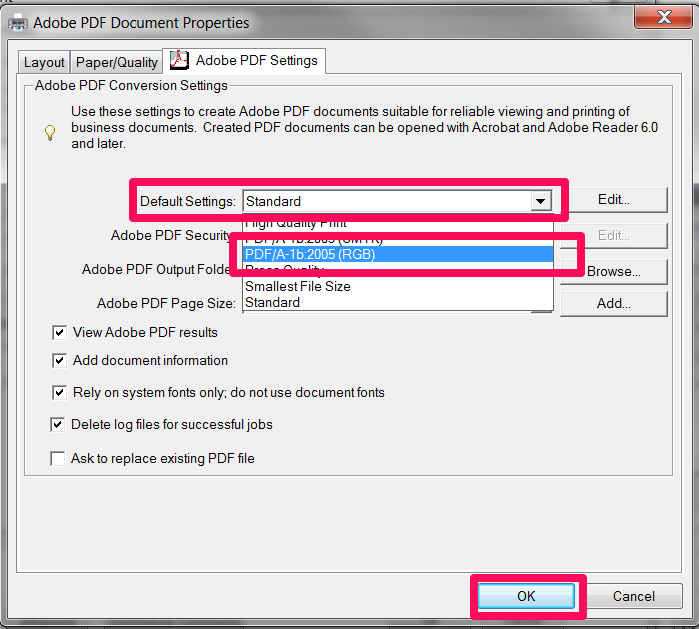
– Select an AdobePDF ‘printer’ (assuming you have an Acrobat print driver installed).
– Select the ‘properties’ of this printer.
– Where it says “Default Settings” change “Standard” to one of the “PDF/A” options.
– Also, while you are here, click the “Paper/Quality” tab and select “Black & White”.
– Click OK and print.
The document should then print (better than the Amyuni driver). You should then be able to upload it without errors and it should pass the online filing validation checks.
Update: My US colleagues advise that for US Patent Office compliance CutePDF is recommend – http://www.cutepdf.com/ .
 IP Chimp